Showing posts with label design. Show all posts

Thursday, March 13, 2014

On Track With Jack: Mobile Best Practices


I hate to break it to all of my admirers out there, but I’m in a serious relationship with my smartphone. She’s the first thing I see in the morning, and the last thing I see when I go to sleep. Day in and day out, I check my email, catch up on the news, and connect with friends on social media. And, I know I’m not alone.

In a recent survey completed by Acxiom...
91.4% of respondents said they use their smartphone to check personal email. - Acxiom "Email Marketing and Mobile Devices: A Survey of Consumer Habits and Perceptions"(2013).

So, what does that mean for email marketing? It means that more and more people are reading email on mobile devices like smartphones and tablets.

Here’s my tip, well question, of the week: Are your emails mobile friendly?

Here are a few pointers to get you started on the mobile track:

  1. Clear and concise content is key. While content always needs to be compelling, cut it down so readers can skim and scroll. Space is limited on mobile, so don’t weigh down your message with too much information. Short clear paragraphs and bullet points are ideal.

      
  2. Scale down your design. The dimensions of the email should also be reduced since mobile screens are a lot smaller. We recommend keeping it between 320-550px wide. Note: Check out our new mobile Smart Templates under the mobile tab.
  3. Use larger text. Fonts should be larger than those in traditional emails. Keep body text at a minimum of 14px and headlines at 22px.
  4. Larger images and spacing. Touch screens are here to stay! Instead of clicking, people will touch. Balance your design with well-spaced images and icons to accommodate fat, I mean healthy, finger errors.
  5. Alt text is a must. Include alt text on your graphics for a responsive design. Note: Image blocking will occur by default, a prompt will display urging users to display messages, similar to desktop. The only mobile OS that does not block images by default is iOs.
  6. Short and sweet subject lines. Long subject lines get cut off, but shorter ones between 24-31 characters work best. Tell your readers what’s inside!
  7. Call on your new Call To Action (CTA). What do you want your readers to do after they receive your message? Include a call to action, but do not use ‘Click Here’. Mobile users cannot click, however, they can tap and swipe.
  8. CTA + Buttons = High CTR (Click-through rate). Make your CTA stand out with a big button. Link out to your website or landing page for more information.  Buttons should be at least 44 pixels and should be centered or left aligned.
  9. Include links. Unsubscribe, Forward to a Friend, Subscribe, and Social Media links are still a must.  Be sure to also keep any View as Webpage link just in case your readers want to view your message in a browser.
  10. Preview, preview, preview. Take a look at the different mobile previews in JangoMail to see how your subscribers will view your message on their mobile device or tablet. Select different Mobile Clients to test your message. 

To recap: With the increasing use of smartphones and tablets, make sure your emails are mobile-friendly. Check out our Mobile Templates to get started! 

With those steps in mind, you are on your way to mobile-friendly messages, and for me, my relationship with my smartphone has never been stronger.  If you have any questions, please do not hesitate to contact a JangoMail expert today at 1-855-709-4099.

Jack the Jangolope
Department of Awesome
JangoMail


About Jack
Jack the Jangolope is our JangoMail mascot.  Each week, look for Jack's emails for marketing advice, trends, and quick tips on how to grow your email marketing plan to the fullest!  Hop into email marketing each week with Jack's helpful tips!
We want to hear from you. Remember, at JangoMail it's your email, your way.  Have a topic you would like Jack to cover?  Email us at marketing@jangomemail.com with the subject line: On Track With Jack.  Follow Jack on Facebook

Wednesday, December 11, 2013

Try Our New JangoMail Smart Templates For The Holidays

By: Melonie Mottice
Marketing Specialist


Hi JangoMail Users!

Gear up for the holidays with our new templates! We have 150 designs to choose from. Impress your subscribers with our striking designs all year long. Be sure to check out our new template menu and editing tips, which cover the basics. Before you know it, you’ll be an email marketing pro, just like Jack!


Follow these steps to get started:

1.  Go to  Messages and  click the blue + New Message button.

2.  Select the JangoMail Smart Template button.


3.  Use the templates as a starting point for your email design.


4.   Browse the template categories in the new menu. Looking for the original Smart Templates? You can find them in the Responsive, RSS to Email, and Simple tabs. 


5.  Choose a favorite by clicking the star at the top of the design you like. To view all of your favorites, click the Favorites tab in the template menu.


6.  To see a full preview of a template, click on the Computer Screen Icon.


7.  Click the Right Arrow to choose a template.


8.  Edit away!  Add in your text, logo, and images.  Each template contains editing tips that will teach you how to customize your message.


9.  Good or bad, email any feedback to marketing@us.jangomail.com.


For any questions, contact our support team by phone at 1-888-465-2646 or submit a Support Request.


Sincerely,

The JangoMail Team

Thursday, January 10, 2013

The new JangoMail.com is live!

Our new JangoMail website is truly all about YOU.

Since we started out, it’s been our only mission to do what we do best – by listening to you, our customers. We’ve always asked for input, feedback, and for you to be brutally honest about what we can do better. And when you responded, our design team went straight to work.

The result is a JangoMail.com that’s easier to read and navigate … featuring more comprehensive data about our growing list of intuitive features. The snappy, new color scheme is pretty neat, too.

 
JangoMail now features your very own customized, segmented content area, too. Whether you’re a Marketing or Brand pro who wants an off-the-shelf solution, or a Developer or IT guru looking to get your hands on some raw code.  You’ll find everything you need to know to make the most of your email marketing.


Plus, we’ll show you the popular features your peers are using right now. (And you might want to take advantage of, too.)


Who is Jack the Jangolope? Like the now confirmed existence of our new mascot, JangoMail has proven that myth can really become reality when it comes to the once unattainable tools for highly successful email marketing. In other words, if our customers can dream it – our team will do its very best to create a tool, technology or feature they need to succeed.

Like our new homepage asks: Are you ready to make your email marketing the stuff of legends? Take a look around. Let us now what you think. Contact us if you have any questions. We may be taking a few minutes to catch our breath after working on our new website. But, you’d better believe we’ll still be on the lookout for your continued feedback to keep making JangoMail the best if can be for you.

Special thanks to our JangoMail development team for making our new website a reality!

Friday, March 02, 2012

How to select images for your marketing material

Guest post from Fotolia, a leading provider of royalty-free images.

Adding visual appeal to all kinds of material from campaigns to blogs to newsletters grabs the audience’s attention. That’s why marketing professionals rely on imagery to enhance their campaigns and overall messaging strategy.

Here are 5 tips to help you select the perfect fit for that added, and much deserved, side of “visual punch”.

Rule # 1: Use your image to communicate
A picture is worth a thousand words, and is indeed a clever and fun way to help your content speak volumes. The right image will not only complement what you have to say, but the message you want to deliver. Keep in mind that you want your image to make a statement. Choose one that is unique and specific to the feel and tone of your content.

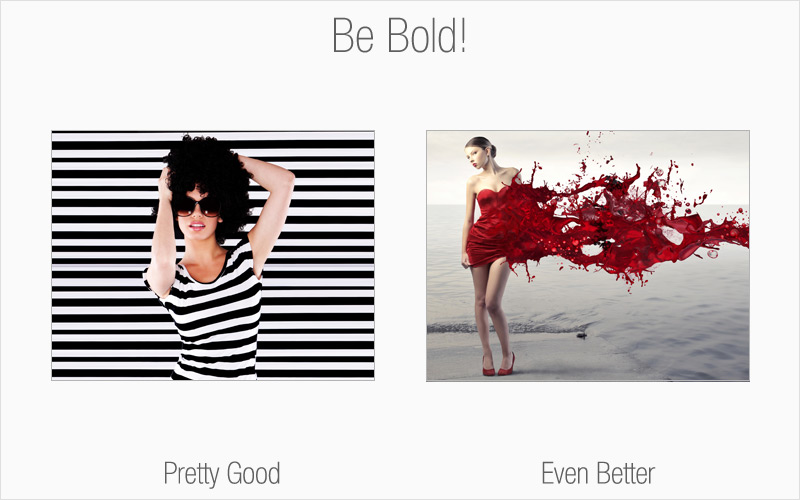
Rule # 2: Be bold
This is your opportunity to think outside the box. Avoid taking the easy route of choosing an image that has a direct correlation with your topic. Consider other angles. There are millions upon millions of royalty-free images available to you, so have fun with your image browsing and dare to be different.

Rule# 3: People like to look at people
Consider using images that feature people as an effective way to reach your audience. Studies show that one of the reasons Facebook is such a hit is because of people’s fascination with looking at other individuals. For the most part, human beings feel a need to relate to others.

Rule # 4: Mind your colors & contrast
Aside from selecting an image that suits your overall theme and message, pay attention to colors and contrast – they’re both very important key factors in conveying the “wow” appeal you’re aiming for. The colors delivered in your image should complement the remainder of your content, including font styles and other colors that you may be using.

Rule # 5: Customize
This is where you can have the most fun with your images, stand out from the competition and be unique. Who’s to say that all you see is all you get? Modify your image to suit your needs, as long as you have the rights to do so. Turn your image into something that completely embodies what you want to communicate. The avenues for creativity are limitless and you better believe no one else will have an image like yours.

Special offer: For a limited time, buy a one-month Fotolia subscription and get a second month free! E-mail corporates@fotolia.com and mention this offer to find out more.