Showing posts with label email. Show all posts

Thursday, January 09, 2014

On Track With Jack: Email Over Snail Mail

Hi Jangolopes!

Brrrrr...I thought the Ice Age was long gone, but I'm not sure after this week. Hibernation sounds pretty good right now, but with postage going up at the end of the month, there are so many emails to send! Turn the heat up on the polar vortex and read my tip of the week:

Choose email over snail mail.

At the end of the month, first-class stamps will cost 49 cents - a figure that has caused many businesses to ramp up their email efforts instead of spending extra money on postage. I encourage you to do the same, especially since email is more effective regardless of the cost of stamps. Here's why:

Speed: Email is really fast, like lightning fast, and your message is delivered to your subscriber within minutes. You can reach anyone from around the world instantly.

Convenience: You can send any message at the touch of a button, 24/7. You can schedule messages ahead of time and set up Autoresponders when you're away. Additionally, email is convenient for subscribers. They can easily respond and take your message wherever they go - on their phone, computer, or tablet.

Privacy and Security: You can send and receive different types of messages in a secure setting to people who want to hear from you. Their information is securely stored and kept private.

Sharing Capabilities: Share different types of emails easily with friends and family. What did we do before Forward to a Friend links and Social Share buttons?

Deliverability and Analytics: Monitor all your efforts through reporting to shape your future campaigns. In a short period of time you can: confirm the status of your message and view the clicks, bounces, and open rates. You can also work with segmented lists to target your audience.


To recap: Choose email over snail mail. The JangoMail team is standing by to help you incorporate more email into your business plan. We have all the tools and special features to make you successful in reaching more subscribers.

Has it been awhile since you logged in? You may have noticed our new user interface and Smart Templates. We're only a phone call away and support is free!  Get in touch with our live call center at 1-855-709-4099 and ask for a demo.

Sincerely,

Jack the Jangolope
Department of Awesome
JangoMail


About Jack
Jack the Jangolope is our JangoMail mascot.  Each week, look for Jack's emails for marketing advice, trends, and quick tips on how to grow your email marketing plan to the fullest!  Hop into email marketing each week with Jack's helpful tips!
We want to hear from you. Remember, at JangoMail it's your email, your way.  Have a topic you would like Jack to cover?  Email us at marketing@jangomemail.com with the subject line: On Track With Jack.  Follow Jack on Facebook

Thursday, July 11, 2013

The Do's & Don'ts of CSS


What do you think YOU'RE doing?
Are you a developer looking to custom code your email templates using CSS (Cascading Style Sheets) - while maximizing the integrity of your layout or desired design?  "Good luck," says the old school (i.e. here comes the hurt).


Fortunately, JangoMail has some solutions. So, we prepared a simple list of "do it" and "don't even think about it" guidelines to ensure your designs look as good and function as well within your emails (and mail services like Gmail and Outlook) as they would on your typically more stylized web pages.

Do it
  • Use tables for layouts, because they're more consistently supported
  • Put your CSS code inline with your content (i.e. <span style="font-family:Arial, Helvetica, Sans-Serif; font-size: 9px; color:#000000;">your content...</span>. Already created a template? Use this tool to move all of your CSS inline. 
  • Set and fix your template width by assigning width, cell padding and cell spacing for all tables and table cells
  • Add whitespace around an image by using hspace and vspace tag attributes, as not all email services support margin and padding inline styles
  • Always include a link so recipients can view your email within a web browser, and "_blank" in links to prompt the opening of a new browser window or tab when viewed within browser-based email services
  • Include a visible link to your website and an eye-catching 'forward to a friend" button


Don't even think about it
  • Count on external or embedded style sheets, as many email services cut everything above the body tag and disable external style sheets
  • Use positioning and floats
  • Incorporate JavaScript into your email - it can trigger spam filters
  • Assign attributes to the <body> tag, as most email services won't acknowledge them
  • Use background images (background color is okay)
  • Include CSS shorthand or CSS properties for positioning (nested tables work better)
That wasn't so bad. It might not be the most inclusive list, but we didn't want to lecture you so late in the week. If you ever have any questions about custom coding, hit us up. Our JangoMail team is here to help any time.

Until next time, have a great rest of the week!


Tuesday, June 25, 2013

Why Haven't You Joined The Video Bandwagon Yet?

Against everything your mother told you, we'll say it. You should do what everyone else is doing - because it could get you further. We're talking about the video "cliff"; and we're encouraging you to swan dive-DO IT.


Here's what's up

A recent study found that total video views among internet users in the US were up 23% year-over-year in Q4 2012. This isn't just an isolated finding, and to validate it, you only need to take a quick look around your own office. People love to share videos of all kinds. Tearjerkers, funny, colorful, imaginative, gross, you name it. The memorable, sensory exposure of video is a great way to grab attention, positive or negative, and prompt viewers to share it.


What this has to do with email marketing

If you can't see it by now, we have some work to do. Maybe these stats will get the point across:
A 2013 survey of marketing executives conducted by The Relevancy Group found that respondents who had used videos in their email campaigns saw real returns on their investments. Fifty-five percent reported higher click-through rates, 44% saw an increase in the amount of time subscribers spent with an email, and 41% reported an increase in the sharing or forwarding of emails.


If you're not doing it, you're not alone
The same survey cited above found that only one-quarter of marketers had actually used video in email marketing campaigns. Forty-three percent said they didn't use videos simply because they lacked the content, making it the most prominent obstacle to the practice. Take a good look at the bar graph to the right. Most of these obstacles seem fairly easy to overcome if you consider the potential results.


Get your footage together and GO!
It's typically assumed that video clips within email marketing is a perfect match for retailers. But, use your imagination, and this medium applies to just about everything. From spanning, enticing product shots that infect viewers with the shopping bug ... to the smiling faces of your baseball league's division champs, urging non-players to sign up for next season ... to clips of tropical destinations in January offered by your Chicago-based travel agency. It ALL works - and easily grabs attention beyond the written word. The biggest obstacle to video inclusion is lack of footage, and honestly, who doesn't have some kind of video capture device these days. And what you don't have, you can easily grab from business partners who are typically more than willing to share footage.

Inputting video into your emails - is it safe?
There are some limitations with many email clients, with security settings that do not permit "live" content (including video and even JavaScript) to be active within the email body itself. Certainly, we want to be able to get the best of both worlds here, so it's now a common practice to highlight a frame shot from your video and tag it with a hyperlink to an off-email host site. So, connect to your YouTube, Vimeo, or other channel, and email away!

As always, if you have any questions about this blog or any JangoMail feature, give us a shout. Until next week, we hope you're having a great start to summer!


Wednesday, June 12, 2013

Check Check ... Check Your Email Rendering Or Beware The Results!

Let's consider the dilemma of delivery optimization through quasi real life situation that is, hopefully, somewhat amusing. Hey, it's mid-week, and we could all probably use a joke.

"Zoolander": Supermodel
So, a comedian in the 80s used to tell a story about his friend who married a supermodel. He thought "cool!". In terms of his perception of survival of the fittest, his kids were going to at least look gorgeous. But to his utter shock and disbelief, the fruits of his (or more precisely her) labor were what the comedian referred to as 'crocodile kids". Despite outward appearances, apparently the model wife had had some work done. And the resulting offspring looked more like "model wife 1.0" than "model wife 6.0".

How this relates to email marketing ...
Sure, karma can be cruel. But for those of us email marketers with better intentions, why do the results of our own deliverables sometimes look just as unattractive?

Everything may look good coming together, but in the end, the results can be an ugly nightmare. We're talking specifically about the X design chromosomes and the Y content chromosomes within your campaigns looking great in one email client, and like a hot mess in others. It happens - a lot. The good news is that JangoMail has a comprehensive delivery check feature that lets you preview how your emails will render across multiple email clients.

Preview before you send - it's easy!
JangoMail has integrated with a third-party partner to give you one of the most innovative email preview rendering tools available today. So, you'll see exactly how your emails will look in more than 25 different email clients (AOL Mail, Gmail, Microsoft Outlook, Mozilla Thunderbird, Windows Mail, Yahoo! Mail and more). Before you even think of hitting SEND, you'll have time to address any issues and remain top of the pro charts.


This special, sneak peek delivery preview is available as a standard feature with your monthly JangoMail subscription, so you can use it as many times as you like.

As always, if you have any questions about our Delivery Rendering Tool or any other JangoMail feature, just ask us. Until next time, have a great rest of the week!


Wednesday, June 05, 2013

Enjoy Your Summer Vaca - Courtesy Of Your Autoresponders

Just when you thought you'd have to respond to all your new email list requests, here come the JangoMail autoresponders to the rescue. Yep - you can actually have your customers and sip that Mai Tai, too. If you're not using this handy feature yet, you could really be missing out on some well-deserved R&R this summer.


This is a great trick for whenever a new subscriber is added to your group after completing a website signup form.


Here's how it works:


1. Simply access the feature in the details section of your list. Follow the simple set-up instructions to craft a message that could include any or all of the following content:
  • Thank new subscribers for requesting admission to your company or organization's list
  • Remind them which list(s) they've subscribed to 
  • Ask them to confirm their contact information (email address) to begin receiving your communications
  • Share with them some of your other email groups they may like to enroll in
  • Share a link to the last communication from this list to get them up-to-speed
  • Offer a link to unsubscribe or change their list preferences

2. Name your autoresponder (i.e. Sales Notifications; Biking Enthusiast Newsletter)

3. Set the time relative to the recipient's "join time" to send your autoresponder. Note that you can create multiple autoresponders at different times (i.e. one hour after; one week later) to request confirmation of their new subscription and then followup with another message if necessary (i.e. "Don't forget to confirm your subscription with us!")

4. Sit back in your Tommy Bahama and take a snooze. You're on your way to seamless, stress-free automation.

If you have any questions about JangoMail autoresponders, just ask us. In the meantime, we hope you're making some stellar plans for the upcoming summer. Remember, even the most dedicated email marketing gurus and enthusiasts need a break every once and a while. So, live it up when you can.

Until next time, have a great rest of the week!

Thursday, May 09, 2013

Is Outlook Mangling Your Emails?

Last week, we talked about some general email rendering issues. This week, we want to dig a little bit deeper. Specifically, let's tackle potential rendering problems using MS Outlook. Why highlight Outlook? Well, let's just say that the Outlook "issue cup" can certainly runneth over - or so we're hearing.

When the original gets mucked up
When your email looks less like Robert Redford's classic Great Gatsby and more like Leonardo DiCaprio's techno-Gatsby version, you know something's not working as it should. (Sorry, couldn't resist).

Here are 8 ways to troubleshoot and avoid some common issues:

1. Start with any tables you may have in your email. Does every table - and column - have a width?
Spot check your code. Make sure the column widths plus any cell spacing you have both add up to the width you gave your table.

2. Make sure that all of your images have a set width and height, as well.

3. Whenever possible, avoid CSS.

4. Replace floats, div's, background images, padding and margins with basic HTML.

5. Consider replacing the spaces between words with &nbsp; if the words appear to be 'pushing' together.

6. Switch out new paragraphs with double line breaks: </br></br>.

7. If your whitespace isn't showing up well, try making a white image with a set width and height, and then putting it in your email.

8. Check all of your HTML and make sure you aren't missing any end tags and fix any HTML errors.

That's about it for now - and we hope this helps a bit. If you continue to have rendering issues with Outlook or experience problems not addressed here, feel free to give us a shout. We're here to help, and our team has seen just about everything.

Until next time, have a great rest of the week!

Wednesday, May 01, 2013

Maintaining Email Integrity With Mobile

Your email marketing campaign may look pretty spiffy on a PC, but check it out on a smartphone or tablet. It could very well look like the stuff of nightmares. Unless you adopt a truly "Mobile Mentality", you're not in shape to move ahead with the rest of the pack - let alone sprint ahead.

The EEC, or email marketing arm of the Direct Marketing Association, is a global professional organization that strives to enhance the image of email marketing and communications. Translation: It's a good idea to listen to what they have to say.


Here's your chance (and benefit)
EEC has some concise and helpful tips to help you keep your email marketing cohesive, attractive, and in terms of mobile connectivity, professional looking.

1. Concentrate on your content
With every email you create, mobile rendering should be a part of the process. This includes: subject lines, body content, graphics, testing, links, metrics (i.e. everything). Your "From" address, subject lines and headlines are perhaps the most important variables to consider. They're the first thing recipients see, so you'd better optimize the smaller space capacities to put your most effective, eye-catching and relevant foot forward first. Used to writing short subject lines? Cut it in half and get used to it. And while you're at it, eliminate more conceptual headlines that prompt viewers to ponder too long. You're dealing with an audience of shorter attention spans, and your competition in the mobile space is fierce.

Bottom line: Mobile simply doesn't offer the space to present a "says it all" graphic, so use your words wisely.

2. Respect fingers and hold the Flash
You'll have better results if you build landing pages optimized for mobile using HTML, CSS and smaller amounts of JAVA. Also remember how your recipients will be scanning through your emails. It's the power of the mighty finger - and unless they find your email communications easy to swipe, they could get fed up and flee before absorbing your message. Improve functionality after the fact, and they may still hesitate to click-through in the future for fear of the repeat experience. Buttons need to be a legible and usable size, as well.

3. Keep your forms brief
EEC recommends simply asking for an email address. While it's easier to submit information on an iPad or similar tablet, how far do you think recipients will go to fill in the tiny blanks on a smartphone?

One final bit of advice
This you already know: Test and then test again. And somewhere in the middle, revisit and tweak your content for the optimal experience. This little bit of sweat on the front end is well worth the desired result on the other side, not to mention the potential ROI you want to achieve in any email marketing campaign.

Get a jump start on testing by using JangoMail's Email Preview Rendering tool! As always, if you have any questions or comments on our blogs, give us a shout.

Until then, have a great week, everyone!


Tuesday, April 23, 2013

Serving Up Outside Ads in Your Email Campaigns

Imagine, if you will, you're 'Joe's Pie Shop'.


It's almost swimsuit season, so business could be better. Time to amp up your marketing outreach and remind customers why your pies are worth the thighs. What do you do? You turn to a targeted email campaign.

You want to reach out to customers to elicit a reaction - a click to product, information, or a customized traffic lane on your website.

After devising an extremely clever and meaningful subject line that grabs their attention, recipients open, determined to dig deeper into what this communication's all about. Then, they're greeted by ...

SERVE IT UP RIGHT! Check out fancy, forever servewear on perfectpietools.com. 

Customer: "What? You have pie AND you're offering a value-add to enhance my pie eating experience? You're the best, Joe."

Well, at least that's the preferred reaction. But the flip side is that your customers' spammy senses could start tingling - damaging your reputation and the overall effectiveness of your email campaigns. Even if you're benefiting from a financial or product trade with this partner, that short-term benefit can get old, very fast, with potential, long-term customer relationships.

The good news is that if you present outside advertisements or endorsements in the right light, mutual success (for you, your partner and above-all your customer) is easy to achieve.

Here are some common sense tips:

1. Be relevant. You're a pie shop. So, skip the ads for gas stations. Unless, of course, you're empathizing with customers about tough economic times. Notifying them of a pie sale - and sharing an ad to the cheapest gas in town (to get to your place) is thoughful. Even better: Presenting an ad for $.50 off vanilla ice cream for Joe's Pie a la mode.

2. Be honest. Why the ad, Joe? If there's any confusion about why there are ads in your emails, address it with customers head-on. "We're including these ads to help keep our pie costs low" or "We provide ads for our community partners as a service to you". However you spin or explain it, your customers will appreciate your honesty. Here's an example from the web that still holds relevance for email: Pandora.com is a successful, live music streaming website - and they're not afraid to share with customers why they need to include ads.

3. Protect your reputation. Congrats - you're hitched to your advertiser in reputation. Now that your brand is tied to another's, beware. If that partner isn't as attentive to retaining ethical marketing as you are, what they do can hurt your business.

4. Exercise moderation. Don't overdo it. Consider there are times your customer simply wants some alone time. That means one-on-one communications between you and them. Email campaigns that includes outside ties or advertisements can be perceived as anything but personal, especially when it happens frequently. Customers may even feel 'sold out'.

5. Go full circle. Cross-branding like this is also an easy way to upsell back to your own products or services. If a tool makes it easy to serve up your pie, why not offer a discount on pie plates to complete the "set"? In this way, all products on the table present a relevant, cohesive offer that makes sense to a recipient. The information evolves from pure ad form to one of a trusted adviser who offers insight based on what you know your customers want or need. How well-thought out of you, Joe!

Have a question or comment about this blog? Looking for more insight to make your email marketing the best it can be? Contact us any time. We'd love to hear from you.

Until then, have a great rest of the week!

Thursday, April 11, 2013

When Good Emails Render Bad

Houston, you have a wingdings problem

Your email newsletter may have been conceived in love and raised under a watchful eye, but now it's talking in wingdings and ignoring every golden layout rule in Yahoo, Outlook and Gmail.

So, how do you teach it to play nice?


Exhale: HTML is still your baby
HTML email campaigns are not only more visually cohesive and polished than Plain Text, but historically also produce more clicks, consumer interest and traceable sales. It's obviously more appealing to show product pictures to your customers or include live links to relevant information. In addition, the DOS-reminiscent presentation of Plain Text is never a match for the brand-reflective power of HTML.

But if you're not following some simple Web Standards, your well-intentioned email campaigns can look like more of a maniacal bomb threat than a customized handshake.


5 tough love solutions for your HTML emails:

1. Avoid background images.
To efficiently separate content and design elements, images should be displayed inline. The CSS property, background-image is often not supported.

<background image: supported>

<background image: unsupported>


2. Keep FLOAT and CLEAR in proper balance.
FLOAT is the glue to your layout, while CLEAR ensures your FLOAT doesn't mask any images. If in doubt, avoid using FLOAT all together. Read more details here.


3. Be careful with your use of MARGIN and PADDING.
MARGIN alignment is the key to avoiding all-out text chaos in a bad render. PADDING is similarly critical, especially when used in conjunction with BACKGROUND-COLOR, LIST-STYLE-IMAGE and BORDER. Render test your emails first and find some fixes here.


4. Consider a different code to denote LINE SPACING.
To create a new line space, try using <br/> (shift+enter) instead of <p> (enter). Some readers push together new paragraphs, making your text look like this:


5. Don't ignore the importance of WIDTH and HEIGHT.
WIDTH directly impacts FLOAT and TEXT-ALIGN, so it's crucial to the overall look and tightness of your email. HEIGHT also lends a firm hand to overall readibility.


Phew - your HTMLs just avoided military school. But if they ever get out of line again - or you just want to learn more ways to enhance your email marketing - contact our JangoMail Support. We'd love to hear from you.

Have an idea for a future JangoMail blog? Talk to us


Thursday, April 04, 2013

Getting The Full Benefit of vBulletin?

The first step to maximizing the effectiveness of using popular forum software packages, like vBulletin, is to enhance them through configuration with JangoMail or JangoSMTP.

In case you're unfamiliar with vBulletin, it's a helpful forum software package that facilitates online community discussions on the topic your website is focused on. The system also sends a variety of emails: new registration confirmations, topic reply notifications, PM notifications, mass email newsletters and more.

So what's the JangoMail connection?
It's about more than expansive reporting features you won't find in vBulletin's baseline. JangoMail's pinpoint and reliable email deliverability ensures that your signup confirmation emails will go through the first time. It's a common issue with forum software - if a user doesn't receive their confirmation email, they can't use your forum. The result is that users need to contact your forum administrator to activate their accounts manually. This may seem like a minute hassle, but considering the size of most forums, the potential problem can cause some big issues down the lines in terms of boosting your user list size - and saving the sanity of your administrator.

Here's how to set it up:
1. Log into your vBulletin Admin CP
2. Go to Settings - Options - Email Options - Edit Settings
3. Scroll down to choose the following settings:

  • SMTP Email: Yes
  • SMTP Host: relay.jangosmtp.net
  • SMTP Port: either 25, 2525, 587 or 465 for SSL/TLS connections
  • SMTP Username: use your JangoMail username
  • SMTP Password: user your JangoMail password
  • SMTP Secure Connection (can be enabled if port 465 is used)

vBulletin can also be used to send mass email newsletters to your users, to keep them engaged. To do so, go to Users - Send Email to Users within your Admin CP.

As always, if you have any questions or need extra help configuring your vBulletin account with JangoMail, contact our Support team at any time.

Have a great rest of the week, everybody!

Wednesday, March 20, 2013

Make The Most Of The 'Madness' this Month

Last year, Twitter users sent over two million Tweets about March college basketball tourneys.

March College BasketballWhile the 'madness' may not be the highlight of everyone's month, there are times you need to send updates and alerts to large, specialized groups before the buzzer.

Here are some hypotheticals:
  • You're a coach, and team parents would love to see a video of that miracle play from the big championship game
  • You're a restauranteur, and you need to get the word out that there will be half-priced mudslides during the Padres' home opener
  • You're the bracket-master, and lunch is on Glenn in Accounting since he just pulled ahead in points

Forget bulletin boards. JangoMail's email distribution list feature (listserv) is an easy way to get everyone on the same page about brackets, club news, special events and more.

Here's how it works:
  • Create a master email list, grouping recipients by interest (eg. college basketball fans, mudslide lovers, the Spanish club)
  • Send one email to your group's master email list (one email to one, all-inclusive email address)
  • Spark a live, ongoing email discussion. When someone replies, they can reply back to your entire list at once (eg. "This place's mudslides are epic. You should go!")

More good news:

JangoMail lets you track (opens, clicks, responses) to your email campaign in real-time to evaluate the effectiveness of your emails and re-customize, as needed. Bounce-backs and removal-requests are handled automatically. And you can add Facebook and Twitter social share links for even greater reach and viral opportunity.

Don't forget... We do surveys too!

Tie in a quick survey with your regular email campaigns. This is a great way to bring in seasonal events and unite them with your business campaigns.  For this time of year, you could throw in things like:
    Surveys
  • Tell us how many hours of the workday you think your organization's employees or volunteers spend creating and tracking March brackets?
  • Do you think March bracket office-play increases overall morale?
  • What is your favorite basketball-watching appetizer?

A little levity, a little fun, and a reason to do a follow up email campaign to keep your brand in front of the customers with your results ... or perhaps have them return to your web site to get the final tally!

Questions?

Did we spring some ideas loose for you? We're here to help. Reach Support for assistance in getting these (or any) features set up!

Friday, March 08, 2013

A New Dashboard

We have a quick update for our JangoMailers – You might have noticed we launched a new dashboard for your login screen to help you navigate the site more quickly!

 
This dashboard is the first thing you'll see when you log in. We like it because you can easily jump to these popular destinations, with quick icons rather than the old text links.

Hover over any of the icons to see a short description of what the feature contains. You'll see some new links to places you might not have explored previously:


Quickly access your list of email database connections, such as MySQL/SQL, Salesforce, Magento, and more.


Jump to the tutorials section of JangoMail where you'd find access to tons of walk-throughs and guides to using features on the site.


Access the full Developer API Documentation for the JangoMail API. Get the in-depth details on all of our methods.


Go to the Developer API Playground. Read quick information on all of the JangoMail API Methods and run test calls (that work!) and show you the response text.


We hope that you enjoy the new Dashboard and that it enhances your experience with JangoMail. We've got some very exciting new features on the way that we should be announcing shortly, so stay tuned!

Thursday, March 07, 2013

Ditch “The Crawl” & get social with school parents

There’s nothing quite like the anger of a baffled parent who shows up to school with their child – only to find it was actually cancelled, delayed, or there's a special event happening that day.

And we’re not just talking snow or hurricanes. Sometimes it’s those sneaky half-day conferences, holidays and teacher workshops that can wreak havoc on the airtight schedules of busy parents. Or what about those special, last-minute "everyone wear school colors" days? It's not easy for parents - and obviously kids - when they're left out of the loop.

(Don't think you can depend on the "backpack express" to get the word out, especially when the unexpected can happen - a.k.a. Fido or worse.)

There are also events that catch even you, as a school principal or administrator, off-guard. It happens – and you need to act quickly to update the masses.


Many of us at JangoMail are parents, so we feel the pain of miscommunication. (Surprise! It’s bring your kid to work day!) But, we also see the flip side for school officials …

So … the big question: What’s the most efficient way to get the word out to the greatest number of busy parents at the same time, instantly?

The answer: JangoMail’s email integration with Facebook and Twitter will help you do it all effortlessly.

Here’s how: Most parents are plugged in – email, calendar alerts, Facebook & Twitter. And connecting to where your parents are is as easy as offering them a few choices in the places they’re most apt to stay in touch with your school.

The choices:

1. Add an Email List Signup Form to your school’s website.
Most parents prefer email, and it’s a highly effective way to communicate daily updates, weekly newsletters and time-sensitive alerts. You can determine what information you want to collect (name, telephone #s, address, etc.) on JangoMail’s customizable, email signup forms to create distribution lists for specific grade levels, neighborhoods, volunteer rosters, etc.

2. Share the announcement via Social Media.
For parents who are less likely to open emails after work hours, but are plugged into social updates on their mobile devices, Facebook and Twitter are great ways to keep them in the loop last minute. Create a View as Webpage link in your email and share it on your Facebook and Twitter profiles. It's a handy way to guide parents back to your email communications. If you know there’s a lot of chatter on your Facebook and Twitter profiles – or that of your PTO/PTA, take a few minutes to share your announcement on those pages.


Have questions or need some more suggestions? 

We can’t make snow days go away, but we’re pretty good with school announcement emails. Hit us up – we’re here to help!

Here are some memories from around the web that might inspire you to beef up your communications strategies in anticipation of next winter:


Thursday, February 28, 2013

The Hotmail to Outlook Shift Means Minimal Pain for Email Marketers

The boards are buzzing (and some Hotmail users are groaning) about the automatic move to Outlook.com.  But for email marketers, is it hip or hassle?

Think of this Microsoft move as more of an overdue upgrade than a blocker. And we have some info and tips to help ensure the continued success of your email marketing as some of your customers potentially transition to Outlook.com.


Email Marketing - The transition from Hotmail to Outlook.com


Here’s a couple things to be aware of …

New: Multiple, alternate email addresses
Outlook.com allows your customers to create alternate email addresses without signing up for additional accounts (five a year, or up to 15 at any one time) like Google requires.

  • What it means:

This can lead to some confusion about unsubscribed addresses. If a customer opts into your email communications with one address (for instance, "me1@outlook.com") and then creates another address linked to that account (for instance, "me2@outlook.com"), they’ll receive your emails at both addresses. Customers can also redirect merchant emails to specific folders (for instance, spamlike@outlook.com), where your messages may not get the exposure you’re hoping for.

  • What to do:

Re-check all of your active campaigns for a spam score. You should be doing this anyway, so it’s not something beyond the norm.  Note: Even though Microsoft doesn't list any changes to spam filtering, the Bayesian databases from Hotmail may be merged with the rest of the Outlook cloud's databases.


New: Filters for better focus
Outlook.com has special filters for viewing certain types of messages.

  • What it means:

For instance, your customers can now select “Shipping updates” for quick access to emails with UPS, FedEx and other tracking numbers for products they’re expecting from you. This will definitely be a bonus for your transactional emails.


New: More time to rethink deleted emails
Deleted messages (emptied from trash) will still be available for an unspecified time, which can help with finding an accidentally deleted email.

  • What it means:

Whether it’s by accident or intended, your customers will have more time to rethink shifting your messages to the Trash bin. And before they make a final scan of its contents, your meaningful, targeted subject line could make the difference in their taking another look.


New: Larger file views
Outlook.com links with Microsoft’s online storage service, SkyDrive, to handle large files.

  • What it means:

This now makes it seamless for your recipients in Outlook.com to get really big attachment files without having to go to an in-between web page to click a download link. This is sort of akin to how Gmail users can view embedded YouTube videos in their messages. JangoMail allows you to send large email attachments, but it is much more expensive, so we still recommend using a link in your email rather than a large attachment.


Some deliverability tips ...


  • If your email has instructions on how to whitelist your email, you'll need to update this to include the new Outlook.com. An Outlook.com user can click the "Add to Contacts" link to add you as a trusted sender or click the "Wait, it's safe!" link in the Junk folder. 
  • You’ll also need to test your emails for all existing campaigns to ensure that the formatting appears the same in Outlook.com as it did in Hotmail.


Other things to be aware of …


  • Outlook.com could potentially mean better email deliverability, since address books will be shared automatically across Microsoft products.
  • For transactional relay only users: If you have any rules running in your database to correct malformed email addresses, you'll want to add rules for Outlook.com.
  • Like Gmail, Outlook.com will have "conversation" mode. So, if your marketing emails have the same subject line, newer emails will eclipse previous versions.
  • Anticipate a tighter integration with Facebook – and potential for redundancy. If a sender address matches a friend’s on Facebook, then the latest posts or other information may appear in your recipient’s Outlook.com sidebar.
  • Like the Outlook desktop app, Outlook.com has a preview pane. This feature won’t be enabled by default, but be aware it could be activated. This may potentially lead to very negligible, lower open rates, as it removes a step between arrival and open, which in turn discourages users from clicking on the "show images" button (since, in most cases, they can see all the pertinent content already).


As always, the JangoMail team is here to answer any questions you may have about this or any other topic. Hit us up – we’re here to help!


For more info from around the web, try these:
Beta News: Get Ready to Move from Hotmail to Outlook
NBC News: Microsoft's New Outlook Mail is a Welcome Hotmail Replacement
CNN: Goodbye Hotmail, Hello Outlook

Thursday, January 10, 2013

The new JangoMail.com is live!

Our new JangoMail website is truly all about YOU.

Since we started out, it’s been our only mission to do what we do best – by listening to you, our customers. We’ve always asked for input, feedback, and for you to be brutally honest about what we can do better. And when you responded, our design team went straight to work.

The result is a JangoMail.com that’s easier to read and navigate … featuring more comprehensive data about our growing list of intuitive features. The snappy, new color scheme is pretty neat, too.

 
JangoMail now features your very own customized, segmented content area, too. Whether you’re a Marketing or Brand pro who wants an off-the-shelf solution, or a Developer or IT guru looking to get your hands on some raw code.  You’ll find everything you need to know to make the most of your email marketing.


Plus, we’ll show you the popular features your peers are using right now. (And you might want to take advantage of, too.)


Who is Jack the Jangolope? Like the now confirmed existence of our new mascot, JangoMail has proven that myth can really become reality when it comes to the once unattainable tools for highly successful email marketing. In other words, if our customers can dream it – our team will do its very best to create a tool, technology or feature they need to succeed.

Like our new homepage asks: Are you ready to make your email marketing the stuff of legends? Take a look around. Let us now what you think. Contact us if you have any questions. We may be taking a few minutes to catch our breath after working on our new website. But, you’d better believe we’ll still be on the lookout for your continued feedback to keep making JangoMail the best if can be for you.

Special thanks to our JangoMail development team for making our new website a reality!

Tuesday, June 19, 2012

Magento, We're Integrated.


Roger that, we've added functionality on JangoMail to connect to your Magento installation!

Magento is a powerful e-commerce platform used by thousands of companies worldwide. JangoMail is a powerful broadcast and transactional email platform used by thousands of companies worldwide. They were meant to connect!

With Magento, companies can host their own secure, robust, and feature-rich web store complete with inventory management, shopping cart, credit card payment system, customer management system and more. Now with JangoMail, Magento users can connect directly to their site to download their customer contact information for seamless use in email campaigns. Setup is simple.

See the full documentation to connect to your Magento site in minutes. Happy emailing!

Friday, March 02, 2012

How to select images for your marketing material

Guest post from Fotolia, a leading provider of royalty-free images.

Adding visual appeal to all kinds of material from campaigns to blogs to newsletters grabs the audience’s attention. That’s why marketing professionals rely on imagery to enhance their campaigns and overall messaging strategy.

Here are 5 tips to help you select the perfect fit for that added, and much deserved, side of “visual punch”.

Rule # 1: Use your image to communicate
A picture is worth a thousand words, and is indeed a clever and fun way to help your content speak volumes. The right image will not only complement what you have to say, but the message you want to deliver. Keep in mind that you want your image to make a statement. Choose one that is unique and specific to the feel and tone of your content.

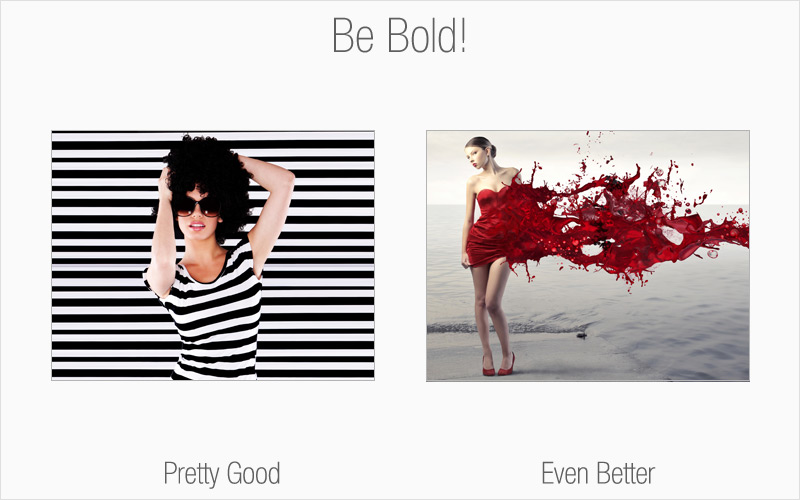
Rule # 2: Be bold
This is your opportunity to think outside the box. Avoid taking the easy route of choosing an image that has a direct correlation with your topic. Consider other angles. There are millions upon millions of royalty-free images available to you, so have fun with your image browsing and dare to be different.

Rule# 3: People like to look at people
Consider using images that feature people as an effective way to reach your audience. Studies show that one of the reasons Facebook is such a hit is because of people’s fascination with looking at other individuals. For the most part, human beings feel a need to relate to others.

Rule # 4: Mind your colors & contrast
Aside from selecting an image that suits your overall theme and message, pay attention to colors and contrast – they’re both very important key factors in conveying the “wow” appeal you’re aiming for. The colors delivered in your image should complement the remainder of your content, including font styles and other colors that you may be using.

Rule # 5: Customize
This is where you can have the most fun with your images, stand out from the competition and be unique. Who’s to say that all you see is all you get? Modify your image to suit your needs, as long as you have the rights to do so. Turn your image into something that completely embodies what you want to communicate. The avenues for creativity are limitless and you better believe no one else will have an image like yours.

Special offer: For a limited time, buy a one-month Fotolia subscription and get a second month free! E-mail corporates@fotolia.com and mention this offer to find out more.