Wednesday, June 17, 2015

We all agree that getting more clicks is a good thing, right?


Did that vague, hopefully intriguing headline get you to click on this link? If you are reading this, then it must have. This is exactly what a headline for a blog is supposed to do. It is the sole reason bloggers set out to write their web monologues. They also write to have their opinions read, but they write to get a bigger audience.

The journalist is trying to get the most people to read and react to their articles, which in turn would make the reporter that much more popular and respected. The retailer is aiming for clients to view more emails and then to buy more goods and services.

What they all have in common is a sense of marketing behind them. The blogger is trying to get the most people they can to read their blog everyday, so they may start making a living out of their personal writings.

However, this isn’t my point. There are people of countless other professions who follow very similar patterns in their work. Journalists, always searching for the next big break in the world’s news, will push basically any boundary with their headlines to get people to read, what they believe, to be Pulitzer Prize winning news stories. Business people send out emails with subject lines they hope clients will feel obligated to open.


Recent Research


Recently, research done at the BI Norwegian Business School in Oslo, Norway has been exploring some new, crucial information on which subject lines will work the best.

The subject line focused on by the study was headlines with questions in them. More specific than just a question, was questions with self-referencing cues (like the headline of this blog) or a question without a self-referencing cue. Much of the studies completed show that questions with self-referencing cues worked well for selling products such as iPhones, couches and televisions. These same questions also made readership of articles go up exponentially, when used in the headline.

Perhaps this is why I used such a question to start my blog… hmmm. Some examples of these questions could be:


  • "Aren't you curious about our new offers?"
  • "Don't you think this is a great deal?"


These questions could lead to more clicks for your email campaign. With all of this being said, the institute claims that much more research has to be completed before any concrete statistics.

Self-Referencing Cues

The self-reference cue, summed up simply, means that the headline or subject line brings the second-person into play. With the use of the words "you" or "we," or something else along those lines, aim to make the person reading feel more integral in the whole operation at hand. This leads to them feeling that they may have to at least read some of the article or email. This tactic, also, makes people feel that they may really need a product. 

It seems to be some marketing with an integrally classic touch to it. It makes people feel a need for a product, but it also makes them feel that they are part of the company selling it to them. This may seem like extremely outdated business, but the research seems to be proving that this marketing is indeed the best move, despite what modern marketers seem to believe.

Conclusion

The question subject line is leading the way in the world of email marketing. You can try it now with the help of JangoMail. Go to jangomail.com now for a free trial into the world of email marketing. 


Sources


Tuesday, June 09, 2015

A/B Testing: Fractional Changes Could Lead to Monumental Growth


High-tech companies across the nation, from Silicon Valley to Dayton, Ohio, utilize A/B testing to evaluate, analyze and contemplate the optimal marketing strategy for their company and their products.

Search engines, clothing stores and merchandise retailers can all discover the best way to reach their customers via email through this evaluation process.

The team members at Google are recognized as being the originators of this testing system 15 years ago. Since that time, companies throughout the world have worked to better the methods used in this process.

A/B Testing Originated from Google.
Courtesy of: https://commons.wikimedia.org/wiki/Google#/media/File:Logo_Google_2013_Official.svg


What is A/B Testing and how can it better your marketing strategies?


A/B, or split, testing has become the standard inspection tool for email marketing. Multiple, not specifically just two, variations of an email are sent out to different groups of recipients. This allows you to see which emails are being looked over or clicked on, and what is leading to transactions.

In simplest terms, you send Email A to Group A and Email B to Group B. Then you extrapolate from the acquired data what seems to be the superior choice for your customized plan.

What to Test?


There is no limit to the variations of ideas your company can test. The point of this evaluation process is to see the strongest components to a business plan so you can test anything from the copy on your website to sales emails and more.

Some commonly tested email units are subject lines, timing of emails and the offers in the email. An offer in an emails headline may be interchanged for a slightly edited discount in another. You may send one group an email offer in the evening, and another group one in the morning.

Even website design has been tested by companies such as Google and Amazon. A/B testing can provide an efficient way to test multiple home pages, and see which one keeps consumers coming and limits your bounce rate.

How is A/B Testing Most Helpful? Can it be detrimental? 


There is no risk to implementing split testing into your business strategy. At the same time, there is no doubt that a majority of customers will find some test emails unappealing, but that is why you run the test – to determine which less than enthralling practices your company should discontinue.

The only slight drawback is that the testing period may last a while, and the data can be hard to decipher. However, once the proper amount of testing has been run, the small inconvenience will pay off in the form of your company’s highest rated email offers being sent out.

How can JangoMail help?


JangoMail offers the best email services available today. JangoMail makes orchestrating A/B testing incredibly easy and profitable with the world’s best email deliverability, 24-hour email monitoring and spam protection technology.


A/B testing could be the tool necessary for your company’s sales to skyrocket and JangoMail wants to help you get there.

To learn more about how JangoMail can help you with A/B email testing, and to learn more about all of JangoMail's features, go to https://jangomail.com/features/. 

Tuesday, June 02, 2015

Eight (Condensed) Steps to Better Email Deliverability


The primary focus of JangoMail is to provide customizable and personalized email deliverability that will separate our customers from their competitors.
These eight steps will help you to better understand the services JangoMail can provide for your company’s email delivery system and how you can get started on the path to better email deliverability with your company.


  1. Branding Your From Address – Anyone can create a free Gmail or Yahoo account and send an email under your company’s name. Having a branded email domain will allow recipients to clearly see who is sending a message and will more likely lead them to click and open, which means more transactions for your company.
  2. Customizing Your Tracking Domain – Every new JangoMail customer acquires an assigned tracking domain that is the same as multiple other clients’. Personalizing your tracking domain name to fit your company will set you apart from the rest of our customers, maximizing your customization.
  3. Setting Up Domain Keys/DKIM – The email authentication standards Domain Keys and DKIM allow senders to securely deliver messages and eliminate fraudulent emails.
  4. Confirming Yahoo Feedback Loop – After completing step 3, Yahoo will send a verification email that will set up a feedback loop between your company’s postmaster, Yahoo and JangoMail. This will allow any recipient complaints to be properly heard by all three parties and conveniently dealt with.
  5. Creating an SPF Record – Setting up a SenderID on your domain will allow proper diagnosis of forgery, spam, worms and viruses in your system. 

  6. Plain Text Message – To lower scrutiny from spam filters, the best idea is to send a corresponding plain text message with every HTML email you deliver.
  7. Return Path Program – Two levels of high-reputation sending are available through JangoMail. The first level is being a member of the Safe List, which allows a sender to preferential treatment from spam filters. The second level of whitelisting is being included on the Certified List, which grants the user access to send emails with the highest standard and through optimal preferential treatment.
  8. Anchor hyperlinks with Text Phrases and not URLS – This practice keeps phishing filters from believing your message is fraudulent.

For the expanded version of this list, including graphics and detailed information, go to https://jangomail.zendesk.com/hc/en-us/articles/200660134-Eight-Steps-to-Set-Up-Email-Deliverability.

Tuesday, May 19, 2015

Talk to Someone About Themselves...

How Personalization Increases Email Engagement


Dale Carnegie’s famous book, How to Win Friends and Influence People was published in 1936 – but some of his most famous lines could have been written about email marketing in 2015.
 “Remember that a person’s name is to that person the sweetest and most important sound in any language.”
 “Talk to someone about themselves and they'll listen for hours.”
 Dale Carnegie, How to Win Friends and Influence People
By using Carnegie’s insights into human nature – adding a few personal details to your email messages – you can increase engagement.

For many people, the first thing that comes to mind when talking about email personalization is customer name. Which subject line do you think would get a better response?
 Your free trial expires tomorrow! 
Sarah, your free trial expires tomorrow! 
 The simple addition of customer name at the beginning of the subject line is more likely to get opened. It appears more personal, and the first name helps it to stand out in a crowded inbox.

But why stop with name?
With JangoMail, the sky’s the limit in terms of personalization. You can personalize messages with data from any field in your list using %%fieldname%%. If your business is retail and you know what items customers have looked at, let them know when it’s on sale or almost out of stock. Ask for a review of a recent purchase. Do your customer’s accumulate points for something? Let them know when they’re close to the next point level.

TripAdvisor is a company that frequently sends messages that utilize a lot of personalization.

TripAdvisor addresses their emails to their customers and includes review information to further engage customers and encourage interaction.
I recently received this email from TripAdvisor. It immediately engaged me by addressing me by name and mentioning reviews I have given. Next they picked ten hotel recommendations based on my recent searches. 
TripAdvisor includes email personalization in many of their emails to connect with their customers and build relationships.
In the same email from TripAdvisor they have listed a few low cost flights from the airport in my city. They also gave me information on hotel deals in cities I've recently looked at on their site. 


So, how is this information collected?
Some information can be gathered with your email opt-in form. However, it’s important to balance your desire for customer information with the customer’s willingness to fill out a long form. It’s important to remember you don’t have to get all the information for your list at one time, it can be gathered slowly as the relationship develops.
What happens if you add personalization to an email with a field that is blank for some customers? You can add alternative text that will show in those instances. For example if you don’t have a customer’s name, you could say: Hurry, your free trial expires tomorrow! Where hurry stands in place of customer name.

Finally, how do you add personalization without looking like big brother is watching?
Think about how the information was obtained. If it’s something your customer submitted, it should be safe to use. In my example from TripAdvisor, I've told them where I live, so including airport information isn't unexpected. If it’s not something that was submitted, but it’s helpful information, that’s also pretty safe. In the TripAdvisor example where they gave me hotel deals, they used information about what I did on their site. It was used in a helpful way though, so it's more likely to get a positive response.

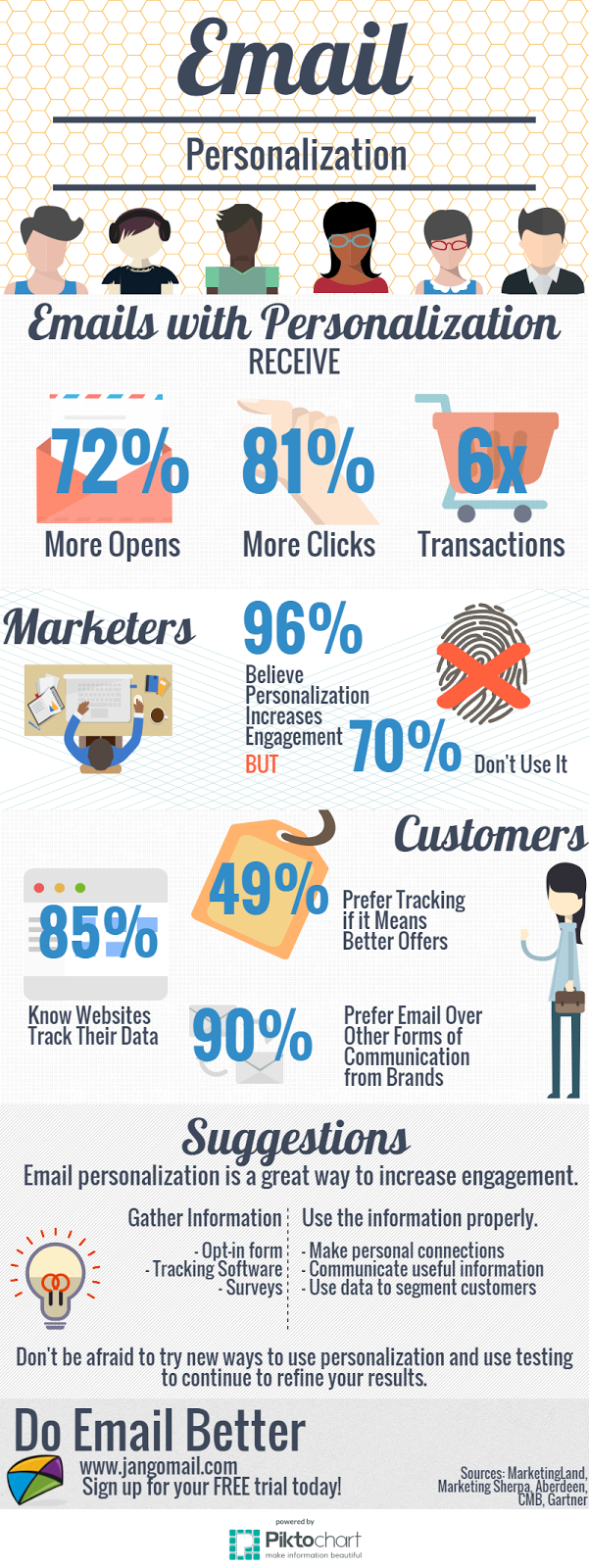
Adding personalization to email increaases engagement with email messages.

The bottom line is that email personalization is a great way to increase engagement. It adds a level of friendliness a medium that can seem cold and helps messages stand out in increasingly crowded inboxes. Don’t be afraid to try new ways to use personalization and use testing to continue to refine your results.

Have you tried personalization? How did it work for you? We’d love to hear more about what you did. Let us know on Facebook or on Twitter @jangomail or #MyJangoMail 

Tuesday, May 05, 2015

Promotions on the JangoMail Team

Two JangoMail team members have recently been promoted. Both of these team members are near and dear to many of our customers; so we wanted to let everyone know the good news.

Stephanie “Angel” Ellis has been promoted to Customer Support Manager and Stephanie Yount to Senior Solutions Engineer.

Angel, as she is known to JangoMail customers, was previously in the role of Onboarding Specialist and has been with the company since May, 2013. She will be leading the support team at JangoMail. In this role she will focus on how her team can better service the needs of JangoMail customers. The support team is the customer facing team at JangoMail, and it is the first place customers go when they call 1-888-GO-JANGO or log a support ticket.

Stephanie Yount has been at JangoMail since May, 2013 and has held roles in customer support and sales. Stephanie is extremely knowledgeable about email and the JangoMail platform. In her new role Stephanie will be in charge of on boarding, full service and sales related delivery.  

Congratulations Angel and Stephanie!

Tuesday, April 28, 2015

Don't Forget to Ask...

Are you missing out on potential customers or subscribers simply because you aren't asking for their email address?

Asking website visitors to subscribe is one of the easiest ways to grow your email file. Once the signup form is created it can operate on its own and doesn't require much ongoing attention.
Of course, there are some things to keep in mind during initial setup. Things to consider include: information to collect, call to action, form placement, and offers.

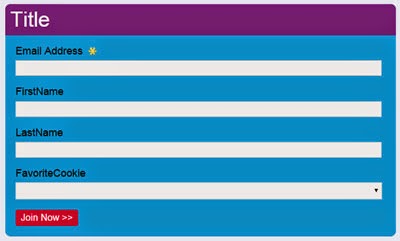
It’s a balancing act to determine what info to request on a signup form. Consider what information will be most beneficial along with the number of fields customers are likely to complete. The main goal of an signup form is to collect email addresses, so it could be as simple as just one field. To gather additional information, consider a progressive opt-in form. Progressive opt-in forms break the sign up process into multiple pieces. Additional information is requested after initial sign up to avoid abandoned subscription forms.

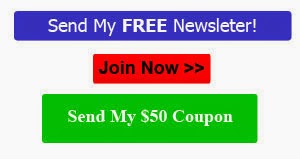
These are examples of call to action buttons for a web signup form, these are key in getting customers to complete forms. Call to action buttons are a critical part of the signup form. They should capture visitor’s attention and compel them to perform an action. There is no one size fits all solution. Test several options to determine what works best. Consider, button color, wording, padding and size.
Consider asking for email addresses on every page of your website. It’s relatively simple to accommodate a one line email subscription box. It can also be used in conjunction with more detailed subscription forms in some locations. If it’s too difficult to place a signup form on every page, find the most visited pages and start there. For best results forms should be placed above the fold (above the scroll).


Incentives encourage signup form completion. The incentive could be a discount, but it doesn't have to be. Consider other offers, such as access to information, a free trial, or a giveaway.  It’s important to promptly give subscribers their reward. A good rule of thumb is to include this information in the first welcome email.

Example of a web signup form, used on a website to help grown email fiel.

If you’re not a developer this may seem like a daunting task, but it doesn't have to be. JangoMail offers an Opt-In Form Designer that can help. With our form designer it’s easy to make a professional looking form that feeds directly to your email list. 

Thursday, April 09, 2015

Change Coming for JangoMail.com!

At JangoMail we are always looking for ways to improve. Lately we have been working to improve our website. Next Wednesday, April 15th, things will look a little different on the JangoMail site.

This first phase of changes will only affect the design of the JangoMail.com site and the URL for some pages of the JangoMail.com site.

What does this mean for you?

  1. The main pages of the JangoMail site will have a new design. If you go directly to the logon page you may not see these updates. However, if you go to our homepage, you will see a brand new design.
  2. The interface after logging in will appear the same, but the URL for all pages will begin app.jangomail.com in your browser.
  3. If you have created any bookmarks to the website, they may not work correctly. You can login at JangoMail.com to access our services. If you have trouble updating your bookmarks, please contact our support team.  

Please don't hesitate to call us with questions. You can  get in touch with us by email at support@us.jangomail.com, by support ticket, or by phone at 888.465.2646 or 937.701.7140

Here’s a sneak peek at part of the new design:

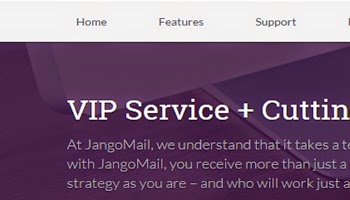
Preview of the new JangoMail homepage, we are working on a new website design.

Preview of the new JangoMail website that we have been working on, Jangolopes love Ohio!


Tuesday, January 06, 2015

Messages Gets a New Look!

With the release of our new Tagging feature, our development team has taken the opportunity to clean up and streamline the appearance of Messages and improve sorting functionality.


You'll now notice a sleeker presentation of campaign information. Campaign subject lines are neatly displayed with sent date and recipient count below. Messages in progress with no subject lines will be indicated by No subject.

With the new "Sort by" option, sorting messages becomes that much easier. Choose to sort campaign by newest, oldest, most recipients, or subject line.

This updated layout allows for the implementation of JangoMail's new Tagging feature. Tagging brings a new level of organization to your messages. Group together many campaigns with a single purpose; separate seemingly identical messages to identify them at a glance. Interested in using this new feature? Contact Support to request it!

Thursday, December 04, 2014

Meet the Team - Angel Ellis

What does Star Wars, reading, and movie quotes all have in common? They have EVERYTHING to do with Angel Ellis, JangoMail's Onboarding Specialist!


Meet Angel Ellis, JangoMail's
 Onboarding Specialist
1.  What is your position at JangoMail?
Onboarding Specialist
2.  How long have you worked for JangoMail?
Since May 2013
3.  What do you like best about working for JangoMail?
I enjoy the people of JangoMail most.  Our team has created a helpful and enjoyable place to work while striving towards improvement both individually and as a team.  Professionally, each of us has specific strengths to put forth.  Relationally, we're all quirky individuals.  Altogether, it makes working for JangoMail a fun and fulfilling experience.
 4.  What feature do you like most?
Personalization.  Whether it's simply adding a first name to make it personal or employing conditional logic to tailor a completely unique message for your recipient, personalization can truly set you apart from other marketers.  The possibilities are limited purely by your imagination.
5.  What is your educational background or what experience led you here?
My educational background is in Biblical Studies, and I have customer service experience.
6.  What is your favorite hobby / pastime?
I would definitely say reading or spending time with family and friends.  Whether it's a lazy night in or an evening combo of dinner and a movie, I love both! Also, I'm a closet nerd that thoroughly enjoys Star Wars and Lord of the Rings.  While I certainly haven't read them all, I am enjoying the ones I am.  Bring on the books! 
7.  What is your guilty pleasure?
Chocolate.  Specifically, Dove Milk Chocolate and Kit Kats!
8. Any interesting facts you'd like to share?
I have a tendency to use quotes from movies or TV shows as standard fare in conversation.  It isn't always something obvious!  It could be a completely normal phrase with the right inflection that calls to mind a certain movie.  Most of the time, I just get blank stares in response, but there are those rare times when I get a look that says, "I understand that reference!"

Thursday, November 13, 2014

Command Center: The Value of Using the JangoMail Sub-Account Feature

How do you manage multiple email marketing campaigns for different clients, departments, or organizations in a JangoMail account?  Use the JangoMail sub-account feature.

To access Sub-Accounts, after you've called JangoMail,
go to 'My Account' and click the 'Sub-Account' tab.
Sub-accounts have multiple uses in a customer-centric relationship management program including:

  • Tailored email marketing campaigns
  • One-to-one customer service
  • Customer retention programs
  • Building brand loyalty
  • Providing information to customers
  • Subscription billing
  • Managing rewards programs

The sub-account feature allows you to set up and manage multiple user accounts within a main JangoMail account.  Each sub-account has a unique user name, password, and from address domain. All managed by the administrator within a main account.

The account settings such as header/footer and unsubscribe list can be unique to each sub-account or can use the master accounts settings.  The main account administrator maintains complete control in setting up and monitoring these parameters for each sub-account.

Once a sub-account is set up, contact lists and email marketing campaigns can then be created and stored in each sub-account folder, separate from other sub-accounts.  The sub-account can be managed either directly through the login or through the master account.  This simplifies management and organization of multiple email campaigns for various customers, departments, or organizations.

The sub-accounts created in a master account are functionally separate, and are not billed individually for usage.  The billing is done only for the main account to allow for the lowest cost per email of the combined total sending volume, a true cost savings.

To set up this feature, call a JangoMail expert at 1-888-465-2646.  Once your master account is confirmed, log in and go to 'My Account'.  Select the 'Sub-Accounts' tab and click 'add a new item,' which will open a new window where you can create a username, password, from address, domain, and sub-account settings.  Once everything is entered, Save your settings and, congratulations, you just create a new sub-account.  It's that easy!

Using the JangoMail sub-account feature allows for the flexibility that marketing, design, public relations, communication, and other business types need to simplify their account management.  All the billing and email marketing services are met by the needs of multiple customers.

Thursday, November 06, 2014

Meet the Team - Jaime Holton

What does peanut farming, kettle chips, and four sevens all have in common? They have EVERYTHING to do with Jaime Holton, JangoMail's Senior Accountant!


Meet Jaime Holton, JangoMail's
Senior Accountant.
1.  What is your position at JangoMail?
Senior Accountant
2.  How long have you worked for JangoMail?
Since May 2013
3.  What do you like best about working for JangoMail?
The family environment.
4.  What is your educational background or what experience led you here?
I have an Associate's Degree in Business Management and just finished my Bachelor's Degree in English / Sociology.  I have been in accounting since 2006.
5.  What is your favorite hobby / pastime?
Anything sports related.
6.  What is your guilty pleasure?
Kettle Chips
7.  Any interesting facts you'd like to share?
I'm a farmer's daughter.  My dad was a cotton and peanut farmer, and a rancher.  I grew up driving tractors and working cattle.  I believe in a strong work ethic.
8.  Do you have a catchphrase, funny saying, or personal quote?
I don't, but I hate the saying, "It is what it is."  This tells me that there is no way to change or improve whatever you are talking about.
9.  Anything else you'd like to share about yourself?
My birthday is 7/7/77 and everyone says I must have good luck.  I do not.  Do not take me gambling.  You will lose all your money.  I don't even try anymore.

Thursday, October 09, 2014

Command Center: Bob Discovers the JangoMail API

By: JangoMail Development
Bob's business is growing. Bob's sales staff needs to use email to make more connections with leads, and to promote more sales to existing customers. Bob's sales staff, however, isn't so great at learning new things. Bob already has his own software to run his business, and his sales staff doesn't like going outside of it to use other tools.

Bob needs his sales staff to use JangoMail's tools, but he wants them to do so directly from his own sales software. After all, his IT and development staff have worked hard to make his software work very well for his purposes.

That's why Bob uses the JangoMail API. API stands for Application Programming Interface. The JangoMail API lets Bob's developer connect his software directly to JangoMail.

Now Bob's sales staff can create messages, build contact lists, and send campaigns directly from Bob's own software. Bob's sales software, with JangoMail's API, brings more power, success, and money to Bob's organization.

But wait, there's more! The JangoMail API gives Bob's software access to reporting, transactional and campaign sending, contact management, account management, and many more features. Almost everything you can do within JangoMail can be done through the JangoMail API. Check for bounces. Count your opens. Do it all!

If you act now, we'll also include the ability to make requests through SOAP, HTTP GET, or HTTP POST. We'll even let you pull the data as string, .NET dataset, or XML.

All of this, AND MORE, for the great low, low price of nothing in addition to your normal subscription costs. That's right, access to the API is free for JangoMail customers. Yes, even free trial customers.

Want to know more about how the JangoMail API like Bob does? Click here to read more. You'll be cool if you do it, just like Bob.


Thursday, October 02, 2014

Meet the Team - Gayle Barcus

What does a chocolate addiction, reading, and quick wit all have in common? They have EVERYTHING to do with Gayle Barcus, JangoMail's Customer Service Representative!


Meet Gayle Barcus, JangoMail's
 Customer Service Representative.
1.  What is your position at JangoMail?
Customer Service Representative
2.  How long have you worked for JangoMail?
Since May 2013
3.  What do you like best about working for JangoMail?
The close-knit group of employees and the company's attention to customer service.
4.  What feature do you like most?
My favorite features are the delivery health check and the delivery optimizer tools. A lot of our customers do not know they can start the troubleshooting process on their own.
5.  What is your educational background or what experience led you here?
I have an Associate's Degree in Mental Health, but my extensive Customer Service experience led me to this job.
6.  What is your favorite hobby / pastime?
Reading and spending time with my friends and family.
7.  What is your guilty pleasure?
Chocolate!
8. Any interesting facts you'd like to share?
My only sister is 20 years younger than me and we both have the same parents!
9. Do you have a catchphrase, funny saying, or personal quote?
With my quick wit and good timing, everything I say is funny...haha!
10. Anything else you'd like to share about yourself?
For the first time in a long time, I genuinely love my job and the people I work with, customers and coworkers alike.

Thursday, September 04, 2014

Command Center: Bob's back with the scrub tool

By: Dave Walker
Technical Support Engineer
Bob has an interesting question.
His contacts are all out of line.
Some addresses bounce, while others opt-out,
and Bob's sales team is starting to whine.

Bob uses JangoMail's system,
to manage his contacts all day,
but he needs to control his list as a whole,
and JangoMail gives him a way.

In Bob's contact list is a toolbox,
with wonderful tools to the rim.
Bob clicks on the menu, and chooses the scrub tool,
his list he is starting to trim.

The scrub tool identifies bounces.
It fixes that typo address.
It cleans all the dupes out, and solves unsubscribe doubt,
and basically fixes the mess.

Since Bob needs this scrub performed daily,
He views all the work with disdain
He mouses to grab the automate tab,
and Bob never sees it again.

With JangoMail's magical scrub tool,
Bob's job is an absolute breeze
He now spends his time making more than a dime
while his sales team are working like bees.


Thursday, August 14, 2014

Command Center: JangoMail Social Media and Facebook

One of JangoMail's advanced capabilities is its integration with Facebook and other social media.  JagoMail's Enterprise level email campaign manager can auto-share email campaigns with social media and Facebook.  This feature increases the audience reach of a marketing campaign or message beyond email.

Email campaigns can also be shared with Twitter and Google Plus.  Facebook and Twitter share statistics can be viewed directly on the JangoMail reporting dashboard.  This information provides a way to quantify social effectiveness, as users spread a campaign across social networks.

Leverage the power of social media to increase marketing effectiveness by embedding a Facebook Like button directly in an email campaign.  Clicking the Like button brings the recipient to a campaign page with a Facebook Like button to like a campaign.

JangoMails integration with social sharing sites also includes granular reports for social tracking of visitors.  The reports will detail who visits a page and from where and how many visitors and numbers of shares.

The new JangoMail social reporting statistics include:

  • # of Unique campaign page visitors
  • # of Visitors from Facebook
  • # of Campaign shares on Facebook
  • # of Campaign Likes on Facebook
  • # of Visitors from Twitter
  • # of Campaign shares on Twitter

Connecting Facebook with JangoMail's seamless social integration features will help to broadcast an email marketing campaign faster and with greater ease.  The net result is increased traffic and more customers.

Monday, July 14, 2014

Command Center: Triggers with Bob

By: Dave Walker
Technical Support Engineer

Bob wants to take his email marketing to the next level. He's been sending out his marketing emails, and they've been getting good results. There is, however, a lot of manual follow-up that is required. Bob's sales team spends a lot of time analyzing open and click data, and sends follow-up emails to those folks, to continue the conversation.

Bob wants to automate the process of sending follow-up emails to his customers. If a customer clicks on a link to visit the website, he wants to send them an email a little later in the day to follow-up on that visit. If they open, but don't click, he wants to send a different message a day or two later.

Bob is using JangoMail's “Triggers” feature to automate his follow-ups. He creates his follow-up messages, and saves them to his account. He then creates a trigger in his account for “Message Opened.” He links the appropriate follow-up message to that trigger. He does the same for “Link Clicked” to catch the clickers.

Now Bob's done. When his customers receive a message and open it, JangoMail will trigger the sending of a follow-up message. Bob can have this action apply to only a single message, or to all messages. He can time the follow-ups so they're sent a few minutes, hours, or days later.

Bob has used JangoMail's simple “Triggers” feature to revolutionize his customer communication, and free up sales team time for more productive things. The force is strong with this one.

Take a look at JangoMail's Trigger features for yourself. Click here for more information on how to revolutionize your own email communications.