A guest post by Gene Marks
I’m still (relatively) young, so I don’t want to sell my business. Also, I have optimistic hopes for the economy over the next few years and this may be a good period for me to earn a few bucks, particularly after all the past slow years. Yeah, I’m definitely not going to cash out. But these are not the real reasons why I’m not ready to sell my business. The real reason is this: my business isn’t worth very much.
Is yours?
Sure, I’ve got plenty of customers. But none of them are under a long term contract so there’s no guaranteed revenue stream. And, being a service business, I don’t have many assets. I’ve got cash and accounts receivable and that’s worth something to a potential buyer. I have no debts and my payables are low, so that’s also a good thing. But I don’t have any real property or equipment, except for a few computers and some office furniture. Maybe your business has a better balance sheet than mine. Maybe you’ve got a lot of equipment that has a good resale value. Or a warehouse full of inventory. Or long term contracts, or a big building with a low mortgage. If you do then good for you. Those are all hard assets and they all have value. So you’ll definitely get a price for those.
But that’s not a business. Those are just assets. Each one of them has a market value. They can be sold off as a group or individually. You’ll hopefully get more than what you paid too. But you’re not going to get what your business is really worth unless you build up a business that’s really worth something. One that can stand on its own. That’s the mark of a truly valuable business.
Take a McDonalds franchise, for example. Now that’s a valuable business. Sure, there’s equipment and property and hard assets. But there is also something else: a process. If you own a McDonald’s franchise your employees know the process. Everyone knows their job, from the manager down to the fry cook. There are procedures to follow. There are written manuals. And rules. If the fry cook leaves then you replace him with another fry cook who gets trained accordingly to those same procedures. You buy from the same suppliers under established, long term contracts. You have the same procedure for selling products to your customers, one that minimizes time and maximizes output. Heck, even if your manager ups and leaves you can find and teach another manager. You’re just inserting that person into the system. It’s like a machine with replaceable parts.
Is your business like that? Can you disappear for a week, two weeks, three weeks and it just keeps running? Do you have a system in place? I don’t. If I were to get hit by a bus tomorrow my business would fold up within weeks. I have no procedures or policies. I’m a micromanager. Everything needs to pass through my hands. Every job is different, every project unique. If someone were to buy my business they would need to also hire me along with it. Who else would keep things running until the new owners could establish their own mark? This is not value. This is just another excuse for employment.
I’m not complaining, mind you. My business is doing well. And it’s been growing. For the past twenty years my company has provided a livelihood for me and my family. It has been a source of income and support for my employees and contractors. But besides its cash and receivables it’s really not of any value to anyone. Is yours?
Gene Marks writes daily for The New York Times and weekly for Forbes, Inc. Magazine, Huffington Post and Fox Business. He runs a 10 person consulting firm outside of Philadelphia.
Showing posts with label marketing. Show all posts
Wednesday, September 11, 2013
Thursday, July 11, 2013
The Do's & Don'ts of CSS

What do you think YOU'RE doing?
Are you a developer looking to custom code your email templates using CSS (Cascading Style Sheets) - while maximizing the integrity of your layout or desired design? "Good luck," says the old school (i.e. here comes the hurt).
Fortunately, JangoMail has some solutions. So, we prepared a simple list of "do it" and "don't even think about it" guidelines to ensure your designs look as good and function as well within your emails (and mail services like Gmail and Outlook) as they would on your typically more stylized web pages.
Do it
- Use tables for layouts, because they're more consistently supported
- Put your CSS code inline with your content (i.e. <span style="font-family:Arial, Helvetica, Sans-Serif; font-size: 9px; color:#000000;">your content...</span>. Already created a template? Use this tool to move all of your CSS inline.
- Set and fix your template width by assigning width, cell padding and cell spacing for all tables and table cells
- Add whitespace around an image by using hspace and vspace tag attributes, as not all email services support margin and padding inline styles
- Always include a link so recipients can view your email within a web browser, and "_blank" in links to prompt the opening of a new browser window or tab when viewed within browser-based email services
- Include a visible link to your website and an eye-catching 'forward to a friend" button
Don't even think about it
- Count on external or embedded style sheets, as many email services cut everything above the body tag and disable external style sheets
- Use positioning and floats
- Incorporate JavaScript into your email - it can trigger spam filters
- Assign attributes to the <body> tag, as most email services won't acknowledge them
- Use background images (background color is okay)
- Include CSS shorthand or CSS properties for positioning (nested tables work better)
Until next time, have a great rest of the week!
Tuesday, June 25, 2013
Why Haven't You Joined The Video Bandwagon Yet?
Against everything your mother told you, we'll say it. You should do what everyone else is doing - because it could get you further. We're talking about the video "cliff"; and we're encouraging you to swan dive-DO IT.
Here's what's up
A recent study found that total video views among internet users in the US were up 23% year-over-year in Q4 2012. This isn't just an isolated finding, and to validate it, you only need to take a quick look around your own office. People love to share videos of all kinds. Tearjerkers, funny, colorful, imaginative, gross, you name it. The memorable, sensory exposure of video is a great way to grab attention, positive or negative, and prompt viewers to share it.
What this has to do with email marketing
If you can't see it by now, we have some work to do. Maybe these stats will get the point across:
A 2013 survey of marketing executives conducted by The Relevancy Group found that respondents who had used videos in their email campaigns saw real returns on their investments. Fifty-five percent reported higher click-through rates, 44% saw an increase in the amount of time subscribers spent with an email, and 41% reported an increase in the sharing or forwarding of emails.

If you're not doing it, you're not alone
The same survey cited above found that only one-quarter of marketers had actually used video in email marketing campaigns. Forty-three percent said they didn't use videos simply because they lacked the content, making it the most prominent obstacle to the practice. Take a good look at the bar graph to the right. Most of these obstacles seem fairly easy to overcome if you consider the potential results.
Get your footage together and GO!
It's typically assumed that video clips within email marketing is a perfect match for retailers. But, use your imagination, and this medium applies to just about everything. From spanning, enticing product shots that infect viewers with the shopping bug ... to the smiling faces of your baseball league's division champs, urging non-players to sign up for next season ... to clips of tropical destinations in January offered by your Chicago-based travel agency. It ALL works - and easily grabs attention beyond the written word. The biggest obstacle to video inclusion is lack of footage, and honestly, who doesn't have some kind of video capture device these days. And what you don't have, you can easily grab from business partners who are typically more than willing to share footage.
Inputting video into your emails - is it safe?
There are some limitations with many email clients, with security settings that do not permit "live" content (including video and even JavaScript) to be active within the email body itself. Certainly, we want to be able to get the best of both worlds here, so it's now a common practice to highlight a frame shot from your video and tag it with a hyperlink to an off-email host site. So, connect to your YouTube, Vimeo, or other channel, and email away!
As always, if you have any questions about this blog or any JangoMail feature, give us a shout. Until next week, we hope you're having a great start to summer!
Here's what's up
A recent study found that total video views among internet users in the US were up 23% year-over-year in Q4 2012. This isn't just an isolated finding, and to validate it, you only need to take a quick look around your own office. People love to share videos of all kinds. Tearjerkers, funny, colorful, imaginative, gross, you name it. The memorable, sensory exposure of video is a great way to grab attention, positive or negative, and prompt viewers to share it.
What this has to do with email marketing
If you can't see it by now, we have some work to do. Maybe these stats will get the point across:
A 2013 survey of marketing executives conducted by The Relevancy Group found that respondents who had used videos in their email campaigns saw real returns on their investments. Fifty-five percent reported higher click-through rates, 44% saw an increase in the amount of time subscribers spent with an email, and 41% reported an increase in the sharing or forwarding of emails.

If you're not doing it, you're not alone
The same survey cited above found that only one-quarter of marketers had actually used video in email marketing campaigns. Forty-three percent said they didn't use videos simply because they lacked the content, making it the most prominent obstacle to the practice. Take a good look at the bar graph to the right. Most of these obstacles seem fairly easy to overcome if you consider the potential results.
Get your footage together and GO!
It's typically assumed that video clips within email marketing is a perfect match for retailers. But, use your imagination, and this medium applies to just about everything. From spanning, enticing product shots that infect viewers with the shopping bug ... to the smiling faces of your baseball league's division champs, urging non-players to sign up for next season ... to clips of tropical destinations in January offered by your Chicago-based travel agency. It ALL works - and easily grabs attention beyond the written word. The biggest obstacle to video inclusion is lack of footage, and honestly, who doesn't have some kind of video capture device these days. And what you don't have, you can easily grab from business partners who are typically more than willing to share footage.
Inputting video into your emails - is it safe?
There are some limitations with many email clients, with security settings that do not permit "live" content (including video and even JavaScript) to be active within the email body itself. Certainly, we want to be able to get the best of both worlds here, so it's now a common practice to highlight a frame shot from your video and tag it with a hyperlink to an off-email host site. So, connect to your YouTube, Vimeo, or other channel, and email away!
As always, if you have any questions about this blog or any JangoMail feature, give us a shout. Until next week, we hope you're having a great start to summer!
Wednesday, June 12, 2013
Check Check ... Check Your Email Rendering Or Beware The Results!
Let's consider the dilemma of delivery optimization through quasi real life situation that is, hopefully, somewhat amusing. Hey, it's mid-week, and we could all probably use a joke.
So, a comedian in the 80s used to tell a story about his friend who married a supermodel. He thought "cool!". In terms of his perception of survival of the fittest, his kids were going to at least look gorgeous. But to his utter shock and disbelief, the fruits of his (or more precisely her) labor were what the comedian referred to as 'crocodile kids". Despite outward appearances, apparently the model wife had had some work done. And the resulting offspring looked more like "model wife 1.0" than "model wife 6.0".
How this relates to email marketing ...
Sure, karma can be cruel. But for those of us email marketers with better intentions, why do the results of our own deliverables sometimes look just as unattractive?
Everything may look good coming together, but in the end, the results can be an ugly nightmare. We're talking specifically about the X design chromosomes and the Y content chromosomes within your campaigns looking great in one email client, and like a hot mess in others. It happens - a lot. The good news is that JangoMail has a comprehensive delivery check feature that lets you preview how your emails will render across multiple email clients.
Preview before you send - it's easy!
JangoMail has integrated with a third-party partner to give you one of the most innovative email preview rendering tools available today. So, you'll see exactly how your emails will look in more than 25 different email clients (AOL Mail, Gmail, Microsoft Outlook, Mozilla Thunderbird, Windows Mail, Yahoo! Mail and more). Before you even think of hitting SEND, you'll have time to address any issues and remain top of the pro charts.
This special, sneak peek delivery preview is available as a standard feature with your monthly JangoMail subscription, so you can use it as many times as you like.
As always, if you have any questions about our Delivery Rendering Tool or any other JangoMail feature, just ask us. Until next time, have a great rest of the week!
| "Zoolander": Supermodel |
How this relates to email marketing ...
Sure, karma can be cruel. But for those of us email marketers with better intentions, why do the results of our own deliverables sometimes look just as unattractive?
Everything may look good coming together, but in the end, the results can be an ugly nightmare. We're talking specifically about the X design chromosomes and the Y content chromosomes within your campaigns looking great in one email client, and like a hot mess in others. It happens - a lot. The good news is that JangoMail has a comprehensive delivery check feature that lets you preview how your emails will render across multiple email clients.
Preview before you send - it's easy!
JangoMail has integrated with a third-party partner to give you one of the most innovative email preview rendering tools available today. So, you'll see exactly how your emails will look in more than 25 different email clients (AOL Mail, Gmail, Microsoft Outlook, Mozilla Thunderbird, Windows Mail, Yahoo! Mail and more). Before you even think of hitting SEND, you'll have time to address any issues and remain top of the pro charts.
This special, sneak peek delivery preview is available as a standard feature with your monthly JangoMail subscription, so you can use it as many times as you like.
As always, if you have any questions about our Delivery Rendering Tool or any other JangoMail feature, just ask us. Until next time, have a great rest of the week!
Thursday, May 09, 2013
Is Outlook Mangling Your Emails?
Last week, we talked about some general email rendering issues. This week, we want to dig a little bit deeper. Specifically, let's tackle potential rendering problems using MS Outlook. Why highlight Outlook? Well, let's just say that the Outlook "issue cup" can certainly runneth over - or so we're hearing.
When the original gets mucked up
When your email looks less like Robert Redford's classic Great Gatsby and more like Leonardo DiCaprio's techno-Gatsby version, you know something's not working as it should. (Sorry, couldn't resist).
Here are 8 ways to troubleshoot and avoid some common issues:
1. Start with any tables you may have in your email. Does every table - and column - have a width?
Spot check your code. Make sure the column widths plus any cell spacing you have both add up to the width you gave your table.
2. Make sure that all of your images have a set width and height, as well.
3. Whenever possible, avoid CSS.
4. Replace floats, div's, background images, padding and margins with basic HTML.
5. Consider replacing the spaces between words with if the words appear to be 'pushing' together.
6. Switch out new paragraphs with double line breaks: </br></br>.
7. If your whitespace isn't showing up well, try making a white image with a set width and height, and then putting it in your email.
8. Check all of your HTML and make sure you aren't missing any end tags and fix any HTML errors.
That's about it for now - and we hope this helps a bit. If you continue to have rendering issues with Outlook or experience problems not addressed here, feel free to give us a shout. We're here to help, and our team has seen just about everything.
Until next time, have a great rest of the week!
When the original gets mucked up
When your email looks less like Robert Redford's classic Great Gatsby and more like Leonardo DiCaprio's techno-Gatsby version, you know something's not working as it should. (Sorry, couldn't resist).
Here are 8 ways to troubleshoot and avoid some common issues:
1. Start with any tables you may have in your email. Does every table - and column - have a width?
Spot check your code. Make sure the column widths plus any cell spacing you have both add up to the width you gave your table.
2. Make sure that all of your images have a set width and height, as well.
3. Whenever possible, avoid CSS.
4. Replace floats, div's, background images, padding and margins with basic HTML.
5. Consider replacing the spaces between words with if the words appear to be 'pushing' together.
6. Switch out new paragraphs with double line breaks: </br></br>.
7. If your whitespace isn't showing up well, try making a white image with a set width and height, and then putting it in your email.
8. Check all of your HTML and make sure you aren't missing any end tags and fix any HTML errors.
That's about it for now - and we hope this helps a bit. If you continue to have rendering issues with Outlook or experience problems not addressed here, feel free to give us a shout. We're here to help, and our team has seen just about everything.
Until next time, have a great rest of the week!
Wednesday, May 01, 2013
Maintaining Email Integrity With Mobile
Your email marketing campaign may look pretty spiffy on a PC, but check it out on a smartphone or tablet. It could very well look like the stuff of nightmares. Unless you adopt a truly "Mobile Mentality", you're not in shape to move ahead with the rest of the pack - let alone sprint ahead.
The EEC, or email marketing arm of the Direct Marketing Association, is a global professional organization that strives to enhance the image of email marketing and communications. Translation: It's a good idea to listen to what they have to say.
Here's your chance (and benefit)
EEC has some concise and helpful tips to help you keep your email marketing cohesive, attractive, and in terms of mobile connectivity, professional looking.
1. Concentrate on your content
With every email you create, mobile rendering should be a part of the process. This includes: subject lines, body content, graphics, testing, links, metrics (i.e. everything). Your "From" address, subject lines and headlines are perhaps the most important variables to consider. They're the first thing recipients see, so you'd better optimize the smaller space capacities to put your most effective, eye-catching and relevant foot forward first. Used to writing short subject lines? Cut it in half and get used to it. And while you're at it, eliminate more conceptual headlines that prompt viewers to ponder too long. You're dealing with an audience of shorter attention spans, and your competition in the mobile space is fierce.
Bottom line: Mobile simply doesn't offer the space to present a "says it all" graphic, so use your words wisely.
2. Respect fingers and hold the Flash
You'll have better results if you build landing pages optimized for mobile using HTML, CSS and smaller amounts of JAVA. Also remember how your recipients will be scanning through your emails. It's the power of the mighty finger - and unless they find your email communications easy to swipe, they could get fed up and flee before absorbing your message. Improve functionality after the fact, and they may still hesitate to click-through in the future for fear of the repeat experience. Buttons need to be a legible and usable size, as well.
3. Keep your forms brief
EEC recommends simply asking for an email address. While it's easier to submit information on an iPad or similar tablet, how far do you think recipients will go to fill in the tiny blanks on a smartphone?
One final bit of advice
This you already know: Test and then test again. And somewhere in the middle, revisit and tweak your content for the optimal experience. This little bit of sweat on the front end is well worth the desired result on the other side, not to mention the potential ROI you want to achieve in any email marketing campaign.
Get a jump start on testing by using JangoMail's Email Preview Rendering tool! As always, if you have any questions or comments on our blogs, give us a shout.
Until then, have a great week, everyone!
The EEC, or email marketing arm of the Direct Marketing Association, is a global professional organization that strives to enhance the image of email marketing and communications. Translation: It's a good idea to listen to what they have to say.
Here's your chance (and benefit)
EEC has some concise and helpful tips to help you keep your email marketing cohesive, attractive, and in terms of mobile connectivity, professional looking.
1. Concentrate on your content
With every email you create, mobile rendering should be a part of the process. This includes: subject lines, body content, graphics, testing, links, metrics (i.e. everything). Your "From" address, subject lines and headlines are perhaps the most important variables to consider. They're the first thing recipients see, so you'd better optimize the smaller space capacities to put your most effective, eye-catching and relevant foot forward first. Used to writing short subject lines? Cut it in half and get used to it. And while you're at it, eliminate more conceptual headlines that prompt viewers to ponder too long. You're dealing with an audience of shorter attention spans, and your competition in the mobile space is fierce.
Bottom line: Mobile simply doesn't offer the space to present a "says it all" graphic, so use your words wisely.
2. Respect fingers and hold the Flash
You'll have better results if you build landing pages optimized for mobile using HTML, CSS and smaller amounts of JAVA. Also remember how your recipients will be scanning through your emails. It's the power of the mighty finger - and unless they find your email communications easy to swipe, they could get fed up and flee before absorbing your message. Improve functionality after the fact, and they may still hesitate to click-through in the future for fear of the repeat experience. Buttons need to be a legible and usable size, as well.
3. Keep your forms brief
EEC recommends simply asking for an email address. While it's easier to submit information on an iPad or similar tablet, how far do you think recipients will go to fill in the tiny blanks on a smartphone?
One final bit of advice
This you already know: Test and then test again. And somewhere in the middle, revisit and tweak your content for the optimal experience. This little bit of sweat on the front end is well worth the desired result on the other side, not to mention the potential ROI you want to achieve in any email marketing campaign.
Get a jump start on testing by using JangoMail's Email Preview Rendering tool! As always, if you have any questions or comments on our blogs, give us a shout.
Until then, have a great week, everyone!
Thursday, April 04, 2013
Getting The Full Benefit of vBulletin?
The first step to maximizing the effectiveness of using popular forum software packages, like vBulletin, is to enhance them through configuration with JangoMail or JangoSMTP.

In case you're unfamiliar with vBulletin, it's a helpful forum software package that facilitates online community discussions on the topic your website is focused on. The system also sends a variety of emails: new registration confirmations, topic reply notifications, PM notifications, mass email newsletters and more.
So what's the JangoMail connection?
It's about more than expansive reporting features you won't find in vBulletin's baseline. JangoMail's pinpoint and reliable email deliverability ensures that your signup confirmation emails will go through the first time. It's a common issue with forum software - if a user doesn't receive their confirmation email, they can't use your forum. The result is that users need to contact your forum administrator to activate their accounts manually. This may seem like a minute hassle, but considering the size of most forums, the potential problem can cause some big issues down the lines in terms of boosting your user list size - and saving the sanity of your administrator.
Here's how to set it up:
1. Log into your vBulletin Admin CP
2. Go to Settings - Options - Email Options - Edit Settings
3. Scroll down to choose the following settings:
vBulletin can also be used to send mass email newsletters to your users, to keep them engaged. To do so, go to Users - Send Email to Users within your Admin CP.
As always, if you have any questions or need extra help configuring your vBulletin account with JangoMail, contact our Support team at any time.
Have a great rest of the week, everybody!

In case you're unfamiliar with vBulletin, it's a helpful forum software package that facilitates online community discussions on the topic your website is focused on. The system also sends a variety of emails: new registration confirmations, topic reply notifications, PM notifications, mass email newsletters and more.
So what's the JangoMail connection?
It's about more than expansive reporting features you won't find in vBulletin's baseline. JangoMail's pinpoint and reliable email deliverability ensures that your signup confirmation emails will go through the first time. It's a common issue with forum software - if a user doesn't receive their confirmation email, they can't use your forum. The result is that users need to contact your forum administrator to activate their accounts manually. This may seem like a minute hassle, but considering the size of most forums, the potential problem can cause some big issues down the lines in terms of boosting your user list size - and saving the sanity of your administrator.
Here's how to set it up:
1. Log into your vBulletin Admin CP
2. Go to Settings - Options - Email Options - Edit Settings
3. Scroll down to choose the following settings:
- SMTP Email: Yes
- SMTP Host: relay.jangosmtp.net
- SMTP Port: either 25, 2525, 587 or 465 for SSL/TLS connections
- SMTP Username: use your JangoMail username
- SMTP Password: user your JangoMail password
- SMTP Secure Connection (can be enabled if port 465 is used)
vBulletin can also be used to send mass email newsletters to your users, to keep them engaged. To do so, go to Users - Send Email to Users within your Admin CP.
As always, if you have any questions or need extra help configuring your vBulletin account with JangoMail, contact our Support team at any time.
Have a great rest of the week, everybody!
Friday, March 08, 2013
A New Dashboard
We have a quick update for our JangoMailers – You might have noticed we launched a new dashboard for your login screen to help you navigate the site more quickly!
This dashboard is the first thing you'll see when you log in. We like it because you can easily jump to these popular destinations, with quick icons rather than the old text links.
Hover over any of the icons to see a short description of what the feature contains. You'll see some new links to places you might not have explored previously:
Quickly access your list of email database connections, such as MySQL/SQL, Salesforce, Magento, and more.

Access the full Developer API Documentation for the JangoMail API. Get the in-depth details on all of our methods.
Go to the Developer API Playground. Read quick information on all of the JangoMail API Methods and run test calls (that work!) and show you the response text.
We hope that you enjoy the new Dashboard and that it enhances your experience with JangoMail. We've got some very exciting new features on the way that we should be announcing shortly, so stay tuned!
This dashboard is the first thing you'll see when you log in. We like it because you can easily jump to these popular destinations, with quick icons rather than the old text links.
Hover over any of the icons to see a short description of what the feature contains. You'll see some new links to places you might not have explored previously:
Quickly access your list of email database connections, such as MySQL/SQL, Salesforce, Magento, and more.

Jump to the tutorials section of JangoMail where you'd find access to
tons of walk-throughs and guides to using features on the site.
Access the full Developer API Documentation for the JangoMail API. Get the in-depth details on all of our methods.
Go to the Developer API Playground. Read quick information on all of the JangoMail API Methods and run test calls (that work!) and show you the response text.
We hope that you enjoy the new Dashboard and that it enhances your experience with JangoMail. We've got some very exciting new features on the way that we should be announcing shortly, so stay tuned!
Thursday, February 28, 2013
The Hotmail to Outlook Shift Means Minimal Pain for Email Marketers
The boards are buzzing (and some Hotmail users are groaning) about the automatic move to Outlook.com. But for email marketers, is it hip or hassle?
Think of this Microsoft move as more of an overdue upgrade than a blocker. And we have some info and tips to help ensure the continued success of your email marketing as some of your customers potentially transition to Outlook.com.
Here’s a couple things to be aware of …
New: Multiple, alternate email addresses
Outlook.com allows your customers to create alternate email addresses without signing up for additional accounts (five a year, or up to 15 at any one time) like Google requires.
This can lead to some confusion about unsubscribed addresses. If a customer opts into your email communications with one address (for instance, "me1@outlook.com") and then creates another address linked to that account (for instance, "me2@outlook.com"), they’ll receive your emails at both addresses. Customers can also redirect merchant emails to specific folders (for instance, spamlike@outlook.com), where your messages may not get the exposure you’re hoping for.
Re-check all of your active campaigns for a spam score. You should be doing this anyway, so it’s not something beyond the norm. Note: Even though Microsoft doesn't list any changes to spam filtering, the Bayesian databases from Hotmail may be merged with the rest of the Outlook cloud's databases.
New: Filters for better focus
Outlook.com has special filters for viewing certain types of messages.
For instance, your customers can now select “Shipping updates” for quick access to emails with UPS, FedEx and other tracking numbers for products they’re expecting from you. This will definitely be a bonus for your transactional emails.
New: More time to rethink deleted emails
Deleted messages (emptied from trash) will still be available for an unspecified time, which can help with finding an accidentally deleted email.
Whether it’s by accident or intended, your customers will have more time to rethink shifting your messages to the Trash bin. And before they make a final scan of its contents, your meaningful, targeted subject line could make the difference in their taking another look.
New: Larger file views
Outlook.com links with Microsoft’s online storage service, SkyDrive, to handle large files.
This now makes it seamless for your recipients in Outlook.com to get really big attachment files without having to go to an in-between web page to click a download link. This is sort of akin to how Gmail users can view embedded YouTube videos in their messages. JangoMail allows you to send large email attachments, but it is much more expensive, so we still recommend using a link in your email rather than a large attachment.
Some deliverability tips ...
Other things to be aware of …
As always, the JangoMail team is here to answer any questions you may have about this or any other topic. Hit us up – we’re here to help!
For more info from around the web, try these:
Beta News: Get Ready to Move from Hotmail to Outlook
NBC News: Microsoft's New Outlook Mail is a Welcome Hotmail Replacement
CNN: Goodbye Hotmail, Hello Outlook
Think of this Microsoft move as more of an overdue upgrade than a blocker. And we have some info and tips to help ensure the continued success of your email marketing as some of your customers potentially transition to Outlook.com.
Here’s a couple things to be aware of …
New: Multiple, alternate email addresses
Outlook.com allows your customers to create alternate email addresses without signing up for additional accounts (five a year, or up to 15 at any one time) like Google requires.
- What it means:
This can lead to some confusion about unsubscribed addresses. If a customer opts into your email communications with one address (for instance, "me1@outlook.com") and then creates another address linked to that account (for instance, "me2@outlook.com"), they’ll receive your emails at both addresses. Customers can also redirect merchant emails to specific folders (for instance, spamlike@outlook.com), where your messages may not get the exposure you’re hoping for.
- What to do:
Re-check all of your active campaigns for a spam score. You should be doing this anyway, so it’s not something beyond the norm. Note: Even though Microsoft doesn't list any changes to spam filtering, the Bayesian databases from Hotmail may be merged with the rest of the Outlook cloud's databases.
New: Filters for better focus
Outlook.com has special filters for viewing certain types of messages.
- What it means:
For instance, your customers can now select “Shipping updates” for quick access to emails with UPS, FedEx and other tracking numbers for products they’re expecting from you. This will definitely be a bonus for your transactional emails.
New: More time to rethink deleted emails
Deleted messages (emptied from trash) will still be available for an unspecified time, which can help with finding an accidentally deleted email.
- What it means:
Whether it’s by accident or intended, your customers will have more time to rethink shifting your messages to the Trash bin. And before they make a final scan of its contents, your meaningful, targeted subject line could make the difference in their taking another look.
New: Larger file views
Outlook.com links with Microsoft’s online storage service, SkyDrive, to handle large files.
- What it means:
This now makes it seamless for your recipients in Outlook.com to get really big attachment files without having to go to an in-between web page to click a download link. This is sort of akin to how Gmail users can view embedded YouTube videos in their messages. JangoMail allows you to send large email attachments, but it is much more expensive, so we still recommend using a link in your email rather than a large attachment.
Some deliverability tips ...
- If your email has instructions on how to whitelist your email, you'll need to update this to include the new Outlook.com. An Outlook.com user can click the "Add to Contacts" link to add you as a trusted sender or click the "Wait, it's safe!" link in the Junk folder.
- You’ll also need to test your emails for all existing campaigns to ensure that the formatting appears the same in Outlook.com as it did in Hotmail.
Other things to be aware of …
- Outlook.com could potentially mean better email deliverability, since address books will be shared automatically across Microsoft products.
- For transactional relay only users: If you have any rules running in your database to correct malformed email addresses, you'll want to add rules for Outlook.com.
- Like Gmail, Outlook.com will have "conversation" mode. So, if your marketing emails have the same subject line, newer emails will eclipse previous versions.
- Anticipate a tighter integration with Facebook – and potential for redundancy. If a sender address matches a friend’s on Facebook, then the latest posts or other information may appear in your recipient’s Outlook.com sidebar.
- Like the Outlook desktop app, Outlook.com has a preview pane. This feature won’t be enabled by default, but be aware it could be activated. This may potentially lead to very negligible, lower open rates, as it removes a step between arrival and open, which in turn discourages users from clicking on the "show images" button (since, in most cases, they can see all the pertinent content already).
As always, the JangoMail team is here to answer any questions you may have about this or any other topic. Hit us up – we’re here to help!For more info from around the web, try these:
Beta News: Get Ready to Move from Hotmail to Outlook
NBC News: Microsoft's New Outlook Mail is a Welcome Hotmail Replacement
CNN: Goodbye Hotmail, Hello Outlook
Thursday, January 10, 2013
The new JangoMail.com is live!
Our new JangoMail website is truly all about YOU.
Since we started out, it’s been our only mission to do what we do best – by listening to you, our customers. We’ve always asked for input, feedback, and for you to be brutally honest about what we can do better. And when you responded, our design team went straight to work.
The result is a JangoMail.com that’s easier to read and navigate … featuring more comprehensive data about our growing list of intuitive features. The snappy, new color scheme is pretty neat, too.
Who is Jack the Jangolope? Like the now confirmed existence of our new mascot, JangoMail has proven that myth can really become reality when it comes to the once unattainable tools for highly successful email marketing. In other words, if our customers can dream it – our team will do its very best to create a tool, technology or feature they need to succeed.
Like our new homepage asks: Are you ready to make your email marketing the stuff of legends? Take a look around. Let us now what you think. Contact us if you have any questions. We may be taking a few minutes to catch our breath after working on our new website. But, you’d better believe we’ll still be on the lookout for your continued feedback to keep making JangoMail the best if can be for you.
Special thanks to our JangoMail development team for making our new website a reality!
Since we started out, it’s been our only mission to do what we do best – by listening to you, our customers. We’ve always asked for input, feedback, and for you to be brutally honest about what we can do better. And when you responded, our design team went straight to work.
The result is a JangoMail.com that’s easier to read and navigate … featuring more comprehensive data about our growing list of intuitive features. The snappy, new color scheme is pretty neat, too.
JangoMail now features your
very own customized, segmented content area, too. Whether you’re a
Marketing or Brand pro who wants an off-the-shelf solution, or a
Developer or IT guru looking to get your hands on some raw code. You’ll
find everything you need to know to make the most of your email
marketing.
Plus, we’ll show you the popular features your peers are using right now. (And you might want to take advantage of, too.)
Who is Jack the Jangolope? Like the now confirmed existence of our new mascot, JangoMail has proven that myth can really become reality when it comes to the once unattainable tools for highly successful email marketing. In other words, if our customers can dream it – our team will do its very best to create a tool, technology or feature they need to succeed.
Like our new homepage asks: Are you ready to make your email marketing the stuff of legends? Take a look around. Let us now what you think. Contact us if you have any questions. We may be taking a few minutes to catch our breath after working on our new website. But, you’d better believe we’ll still be on the lookout for your continued feedback to keep making JangoMail the best if can be for you.
Special thanks to our JangoMail development team for making our new website a reality!
Labels:
design,
email,
marketing,
new,
newsletters,
site,
transactional
Tuesday, June 19, 2012
Magento, We're Integrated.
Roger that, we've added functionality on JangoMail to connect to your Magento installation!
Magento is a powerful e-commerce platform used by thousands of companies worldwide. JangoMail is a powerful broadcast and transactional email platform used by thousands of companies worldwide. They were meant to connect!
With Magento, companies can host their own secure, robust, and feature-rich web store complete with inventory management, shopping cart, credit card payment system, customer management system and more. Now with JangoMail, Magento users can connect directly to their site to download their customer contact information for seamless use in email campaigns. Setup is simple.
See the full documentation to connect to your Magento site in minutes. Happy emailing!
Labels:
email,
integration,
magento,
marketing,
newsletter
Thursday, March 29, 2012
Calling the JangoMail API in Ruby Using SOAP
If you're integrating in a Ruby environment, then Savon is a great, versatile way to call SOAP web services. In this example, we use savon to build a soap client for the JangoMail API, then call Groups_GetList_String. To test it with your own account, just insert your own JangoMail/JangoSMTP credentials. Download the source code for this example to start your own integration!
# make sure to include savon for building soap requests
# see http://savonrb.com/ to download
require 'savon'
# first, build the soap client from the wsdl
client = Savon::Client.new
"http://api.jangomail.com/api.asmx?wsdl"
# specify the xml for the request, inserting your credentials
response = client.request
"http://api.jangomail.com/Groups_GetList_String" do |soap|
soap.xml = """<?xml version=\"1.0\" encoding=\"utf-8\"?>
<soap12:Envelope xmlns:xsi=\"http://www.w3.org/2001/XMLSch...
<soap12:Body>
<Groups_GetList_String xmlns=\"http://api.jangomail.com/\">
<Username>Your JangoMail/JangoSMTP Username</Username>
<Password>Your JangoMail/JangoSMTP Password</Password>
<RowDelimiter> </RowDelimiter>
<ColDelimiter> - </ColDelimiter>
<TextQualifier></TextQualifier>
</Groups_GetList_String></soap12:Body></soap12:Envelope>"""
end
Friday, March 02, 2012
How to select images for your marketing material
Guest post from Fotolia, a leading provider of royalty-free images.
Adding visual appeal to all kinds of material from campaigns to blogs to newsletters grabs the audience’s attention. That’s why marketing professionals rely on imagery to enhance their campaigns and overall messaging strategy.
Here are 5 tips to help you select the perfect fit for that added, and much deserved, side of “visual punch”.
Rule # 1: Use your image to communicate
A picture is worth a thousand words, and is indeed a clever and fun way to help your content speak volumes. The right image will not only complement what you have to say, but the message you want to deliver. Keep in mind that you want your image to make a statement. Choose one that is unique and specific to the feel and tone of your content.
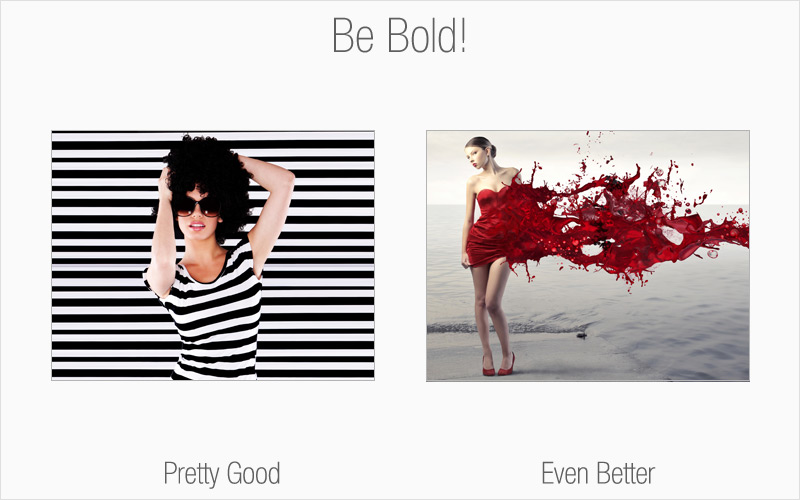
Rule # 2: Be bold
This is your opportunity to think outside the box. Avoid taking the easy route of choosing an image that has a direct correlation with your topic. Consider other angles. There are millions upon millions of royalty-free images available to you, so have fun with your image browsing and dare to be different.
Rule# 3: People like to look at people
Consider using images that feature people as an effective way to reach your audience. Studies show that one of the reasons Facebook is such a hit is because of people’s fascination with looking at other individuals. For the most part, human beings feel a need to relate to others.
Rule # 4: Mind your colors & contrast
Aside from selecting an image that suits your overall theme and message, pay attention to colors and contrast – they’re both very important key factors in conveying the “wow” appeal you’re aiming for. The colors delivered in your image should complement the remainder of your content, including font styles and other colors that you may be using.
Rule # 5: Customize
This is where you can have the most fun with your images, stand out from the competition and be unique. Who’s to say that all you see is all you get? Modify your image to suit your needs, as long as you have the rights to do so. Turn your image into something that completely embodies what you want to communicate. The avenues for creativity are limitless and you better believe no one else will have an image like yours.
Special offer: For a limited time, buy a one-month Fotolia subscription and get a second month free! E-mail corporates@fotolia.com and mention this offer to find out more.
Adding visual appeal to all kinds of material from campaigns to blogs to newsletters grabs the audience’s attention. That’s why marketing professionals rely on imagery to enhance their campaigns and overall messaging strategy.
Here are 5 tips to help you select the perfect fit for that added, and much deserved, side of “visual punch”.
Rule # 1: Use your image to communicate
A picture is worth a thousand words, and is indeed a clever and fun way to help your content speak volumes. The right image will not only complement what you have to say, but the message you want to deliver. Keep in mind that you want your image to make a statement. Choose one that is unique and specific to the feel and tone of your content.
Rule # 2: Be bold
This is your opportunity to think outside the box. Avoid taking the easy route of choosing an image that has a direct correlation with your topic. Consider other angles. There are millions upon millions of royalty-free images available to you, so have fun with your image browsing and dare to be different.
Rule# 3: People like to look at people
Consider using images that feature people as an effective way to reach your audience. Studies show that one of the reasons Facebook is such a hit is because of people’s fascination with looking at other individuals. For the most part, human beings feel a need to relate to others.
Rule # 4: Mind your colors & contrast
Aside from selecting an image that suits your overall theme and message, pay attention to colors and contrast – they’re both very important key factors in conveying the “wow” appeal you’re aiming for. The colors delivered in your image should complement the remainder of your content, including font styles and other colors that you may be using.
Rule # 5: Customize
This is where you can have the most fun with your images, stand out from the competition and be unique. Who’s to say that all you see is all you get? Modify your image to suit your needs, as long as you have the rights to do so. Turn your image into something that completely embodies what you want to communicate. The avenues for creativity are limitless and you better believe no one else will have an image like yours.
Special offer: For a limited time, buy a one-month Fotolia subscription and get a second month free! E-mail corporates@fotolia.com and mention this offer to find out more.
Friday, January 06, 2012
We are Hiring! We are Looking for a Rockstar Sales/Support Rep (Work from Home).
Are you a highly motivated email marketing expert looking to work from home and delight your customers? JangoMail is seeking a detail-oriented and experienced rockstar Sales and Support Rep to join our tight-knit, nimble, unique, and fun team. If you enjoy and excel at customer service, understand email marketing concepts, have a solid sales foundation with both prospective and existing clients, and are proud of your web savviness, we want to hear from you!
My name is Ajay, and I'm the founder and CEO of JangoMail, a small but quickly growing web-based email marketing plaform. What is JangoMail? JangoMail is a highly profitable, rapidly growing and successful web-based email marketing system that allows businesses to create, send, and track email campaigns. JangoMail was launched in 2001 and has over 4,000 customers worldwide in a variety of sizes and industries. JangoMail is strictly opt-in and does not allow the use of purchased, rented or harvested lists with our system. We offer two services: http://www.jangomail.com and http://www.jangosmtp.com. You would assist customers with both services.
WHAT WE NEED:
As our resident rockstar Sales and Support Rep, you would be responsible for helping us grow our client base by developing great customer relationships and turning prospects into customers. At JangoMail, we use a customer-initiated sales approach so we're not looking for someone to just coldcall prospects and see who bites - we want someone who has the trifecta of sales experience, customer service excellence, and tech support ability to answer product and pricing questions from prospective clients, demo the product and explain how our features meet their technical needs, and get a trial user confident enough to convert to a paying client. Prospects come to us with interest and questions: you close the sales. Though you don't necessarily need a tech support background, you must be an exceptionally skilled user who can explain the product to new non-geek users, answer questions about technical specs, and help clients understand how our software meets their needs. Our ideal candidate would also have the solid sales background to help guide and improve JangoMail's sales strategies. You can be located anywhere in the country provided you have a suitable home office from which to work.
PRIMARY JOB RESPONSIBILITIES
*Answer customer sales inquiries via phone call and email.
*Explain features of JangoMail to interested parties and proactively demonstrate product value to potential and current customers.
*Develop good customer relationships and increasing brand loyalty.
*Help new customers gain confidence in product use and work to move trial users to paying customers.
*Proactively reach out to current clients about deeper product features to improve their experience and develop product loyalty.
*Identify new potential product features and developments based on customer needs.
*Manage customer requests for upgrades, product pricing, and product overviews.
REQUIRED SKILLS AND EXPERIENCE
*Superior written communication. (This is one of the most important qualities when I hire. You must have a strong command of the English language.)
*Experience using email marketing products and knowledge of email marketing concepts like "open-tracking," "click-tracking," and "deliverability."
*Excellent customer service skills. You can't just be a sales whiz; you also need to genuinely enjoy helping customers and have the knowledge and personality to teach the technology.
*A mastery of Windows and Microsoft Office, especially Word, Excel, and Access.
*The more technical and web savvy you are, the better. You need to know the client side of email marketing and have some background in SaaS applications, HTML, and software support or sales. You get the point: non-geek sales people need not apply.
*Amazing multitasking skills paired with incredible organization and attention to detail.
*The ability to lead and carry out tasks independently from a home office. JangoMail is based in Dayton, Ohio, but this particular associate can work from anywhere in the country provided a proper home office environment is available.
To apply, please email your application to sales-search at us.jangomail.com (Replace at with an @ sign.). Your cover letter should be the body of the email message, and you should attach your resume in .rtf (Rich Text Format) format. I love detail -- the more detail you convey about yourself in your cover letter, the better!
Afraid you're seeing this posting too late? Check the status of the job here: http://www.jangomail.com/Sales-Rep-Search-Status.asp
My name is Ajay, and I'm the founder and CEO of JangoMail, a small but quickly growing web-based email marketing plaform. What is JangoMail? JangoMail is a highly profitable, rapidly growing and successful web-based email marketing system that allows businesses to create, send, and track email campaigns. JangoMail was launched in 2001 and has over 4,000 customers worldwide in a variety of sizes and industries. JangoMail is strictly opt-in and does not allow the use of purchased, rented or harvested lists with our system. We offer two services: http://www.jangomail.com and http://www.jangosmtp.com. You would assist customers with both services.
WHAT WE NEED:
As our resident rockstar Sales and Support Rep, you would be responsible for helping us grow our client base by developing great customer relationships and turning prospects into customers. At JangoMail, we use a customer-initiated sales approach so we're not looking for someone to just coldcall prospects and see who bites - we want someone who has the trifecta of sales experience, customer service excellence, and tech support ability to answer product and pricing questions from prospective clients, demo the product and explain how our features meet their technical needs, and get a trial user confident enough to convert to a paying client. Prospects come to us with interest and questions: you close the sales. Though you don't necessarily need a tech support background, you must be an exceptionally skilled user who can explain the product to new non-geek users, answer questions about technical specs, and help clients understand how our software meets their needs. Our ideal candidate would also have the solid sales background to help guide and improve JangoMail's sales strategies. You can be located anywhere in the country provided you have a suitable home office from which to work.
PRIMARY JOB RESPONSIBILITIES
*Answer customer sales inquiries via phone call and email.
*Explain features of JangoMail to interested parties and proactively demonstrate product value to potential and current customers.
*Develop good customer relationships and increasing brand loyalty.
*Help new customers gain confidence in product use and work to move trial users to paying customers.
*Proactively reach out to current clients about deeper product features to improve their experience and develop product loyalty.
*Identify new potential product features and developments based on customer needs.
*Manage customer requests for upgrades, product pricing, and product overviews.
REQUIRED SKILLS AND EXPERIENCE
*Superior written communication. (This is one of the most important qualities when I hire. You must have a strong command of the English language.)
*Experience using email marketing products and knowledge of email marketing concepts like "open-tracking," "click-tracking," and "deliverability."
*Excellent customer service skills. You can't just be a sales whiz; you also need to genuinely enjoy helping customers and have the knowledge and personality to teach the technology.
*A mastery of Windows and Microsoft Office, especially Word, Excel, and Access.
*The more technical and web savvy you are, the better. You need to know the client side of email marketing and have some background in SaaS applications, HTML, and software support or sales. You get the point: non-geek sales people need not apply.
*Amazing multitasking skills paired with incredible organization and attention to detail.
*The ability to lead and carry out tasks independently from a home office. JangoMail is based in Dayton, Ohio, but this particular associate can work from anywhere in the country provided a proper home office environment is available.
To apply, please email your application to sales-search at us.jangomail.com (Replace at with an @ sign.). Your cover letter should be the body of the email message, and you should attach your resume in .rtf (Rich Text Format) format. I love detail -- the more detail you convey about yourself in your cover letter, the better!
Afraid you're seeing this posting too late? Check the status of the job here: http://www.jangomail.com/Sales-Rep-Search-Status.asp
Tuesday, December 20, 2011
Interview with Josh Malks, author of Cord Complete
Recently we had the pleasure of catching up with JangoMail customer and classic car buff Josh Malks. Josh is author of Cord Complete and a first time JangoMail client who saw great success promoting his book via email. After selling on web marketplaces for over a year, he sold out all remaining copies of his book using an email promotion - no mean feat! We enjoyed talking to Josh and are excited for his next book (and email) project. Here's what Josh had to say about his experiences:
JangoMail: Hi Josh. Thanks for taking the time to talk to us. You have been using JangoMail to market your new book. Could you tell me a little about your book?
Josh: My book is a huge "coffee table" reference work on the Cord automobile. Sounds a bit esoteric, but the car has a large following and the book itself is just beautiful. See www.cordcomplete.com.
JangoMail: It sounds like your book sold out pretty quickly! Congrats. What did you do to advertise it and what made you try email marketing?
Josh: The book as been on sale on the above website, on Amazon, through bookstores, in car museum giftshops, etc, for about 18 months. There were still several hundred left in stock that I wanted to clear out.
JangoMail: Could you tell us how you used email marketing to help with your sales? Were there any newsletters that were particularly successful?
Josh: I decided to use the thousands of names of purchasers of my previous six books on antique cars to drive potential purchasers to the website, where a final clearance sale is being held.
I have never used a service like JangoMail before. I found the system to be simple to use, and Anne's support was outstanding. If/when I write again, I will use JangoMail at the beginning, not just at the end!
JangoMail: We are happy to hear that! Thanks again for taking the time to speak with us!
Thanks to Josh for sharing his experience. If you have an interesting story on how JangoMail has helped drive your sales, we'd love to hear it!
JangoMail: Hi Josh. Thanks for taking the time to talk to us. You have been using JangoMail to market your new book. Could you tell me a little about your book?
Josh: My book is a huge "coffee table" reference work on the Cord automobile. Sounds a bit esoteric, but the car has a large following and the book itself is just beautiful. See www.cordcomplete.com.
JangoMail: It sounds like your book sold out pretty quickly! Congrats. What did you do to advertise it and what made you try email marketing?
Josh: The book as been on sale on the above website, on Amazon, through bookstores, in car museum giftshops, etc, for about 18 months. There were still several hundred left in stock that I wanted to clear out.
JangoMail: Could you tell us how you used email marketing to help with your sales? Were there any newsletters that were particularly successful?
Josh: I decided to use the thousands of names of purchasers of my previous six books on antique cars to drive potential purchasers to the website, where a final clearance sale is being held.
I have never used a service like JangoMail before. I found the system to be simple to use, and Anne's support was outstanding. If/when I write again, I will use JangoMail at the beginning, not just at the end!
JangoMail: We are happy to hear that! Thanks again for taking the time to speak with us!
Thanks to Josh for sharing his experience. If you have an interesting story on how JangoMail has helped drive your sales, we'd love to hear it!
Sunday, April 03, 2011
New Feature: RSS to Email Campaigns
This morning we're excited to announce the launch of our RSS to Email feature -- the ability to have JangoMail monitor your blog, and automatically email your subscribers whenever a new article is posted. The JangoMail RSS Email Campaign generator supports the following feed types:
Step 1: Create an RSS email template
Go to the Messages section and click on Compose New Message. You can either create a campaign from scratch, or use the existing Basic RSS to Email Template that appears as an option when you click on with a JangoMail Smart Template. Click the Select icon to select this template.
An RSS campaign template can have the following personalization variables in the Subject and Message areas:
%%rss_author%%
%%rss_title%%
%%rss_content%%
%%rss_url%%
The provided basic RSS template makes use of all of these variables. You can also customize the basic template by choosing it and then making your own modifications.
Important Note: To save your template to the system, just Send or Preview it to at least one recipient.
Step 2: Setup your blog's RSS feed in JangoMail
Next, set up your blog's RSS Feed under Settings --> Sending and Receiving --> RSS Feeds.
If you don't know your blog's RSS feed, try your blog address, followed by "atom.xml" or "rss.xml". For example, the feed for the JangoMail In Progress blog can be accessed at either:
http://blog.jangomail.com/atom.xml or http://blog.jangomail.com/rss.xml
You will need to know the location of your blog's feed before you can proceed with this feature.
Click on Add RSS Feed and fill out the rest of the form, as shown below. In this example, we are monitoring the TechCrunch blog, and the feed URL is http://www.techcrunch.com/feed/atom. We have to set it to send immediate email notifications whenever a new blog post is published, and the emails will go to the List #41172369, as well as to recipients from the web database included in the given SQL query:
Choosing Recipients
When specifying which recipients will receive RSS email campaigns, you can choose from:
Scheduling
JangoMail will check feeds for new posts once every minute and will send out your new post to your subscribers almost instantly, if you have your feed Schedule set to send Immediately. If you instead set it to Daily and enter a time of day, then JangoMail will wait until the specified time, either on the same day, or the next day, before sending out new posts.
Reports
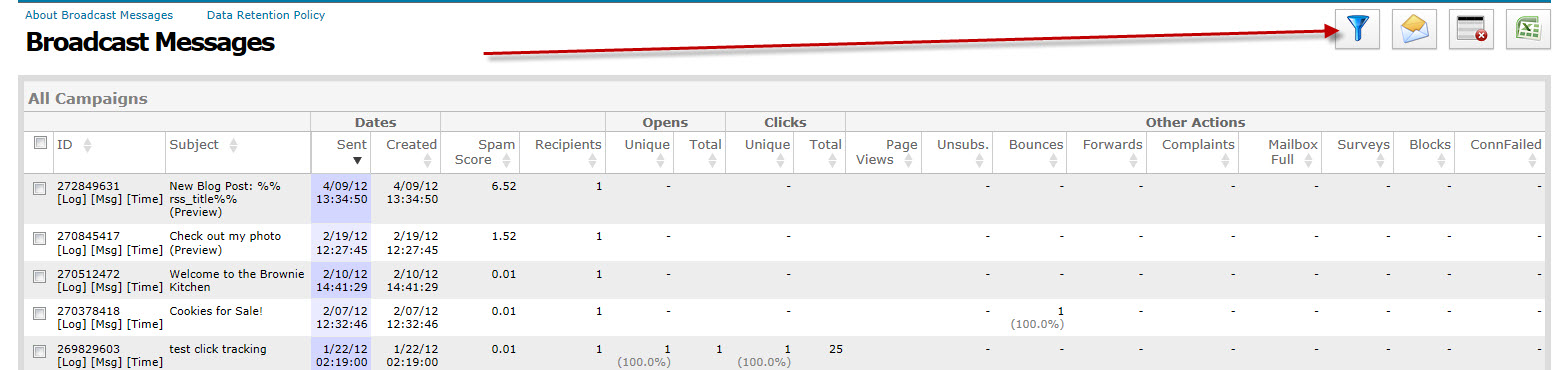
After you've sent some RSS email campaigns, you can view your campaigns' statistics under the Reports tab. Go to Broadcast Message Reports and click the Filter icon. To view just the statistics for RSS email campaigns, set the appropriate Filter:
How is JangoMail's RSS-to-Email feature different from other RSS-to-Email services?
JangoMail's RSS to Email campaign feature does much more than other RSS/email tools, including allowing you full control of the design of the emails, full tracking (opens, clicks, integration with Google Analytics), and complete list management (unsubscribes, bounces, complaints via feedback loops).
Additionally, JangoMail's tool allows you to send to an entire Email List, a segmented portion of an Email List, or a set of recipient data pulled in real-time from your web site's database.
Resources:
To read more about RSS and ATOM specifications, see the articles:
http://en.wikipedia.org/wiki/RSS
http://en.wikipedia.org/wiki/Atom_%28standard%29
http://www.intertwingly.net/wiki/pie/Rss20AndAtom10Compared
- RSS 1.0
- RSS 2.0
- Atom
Step 1: Create an RSS email template
Go to the Messages section and click on Compose New Message. You can either create a campaign from scratch, or use the existing Basic RSS to Email Template that appears as an option when you click on with a JangoMail Smart Template. Click the Select icon to select this template.
An RSS campaign template can have the following personalization variables in the Subject and Message areas:
%%rss_author%%
%%rss_title%%
%%rss_content%%
%%rss_url%%
The provided basic RSS template makes use of all of these variables. You can also customize the basic template by choosing it and then making your own modifications.
Important Note: To save your template to the system, just Send or Preview it to at least one recipient.
Step 2: Setup your blog's RSS feed in JangoMail
Next, set up your blog's RSS Feed under Settings --> Sending and Receiving --> RSS Feeds.
If you don't know your blog's RSS feed, try your blog address, followed by "atom.xml" or "rss.xml". For example, the feed for the JangoMail In Progress blog can be accessed at either:
http://blog.jangomail.com/atom.xml or http://blog.jangomail.com/rss.xml
You will need to know the location of your blog's feed before you can proceed with this feature.
Click on Add RSS Feed and fill out the rest of the form, as shown below. In this example, we are monitoring the TechCrunch blog, and the feed URL is http://www.techcrunch.com/feed/atom. We have to set it to send immediate email notifications whenever a new blog post is published, and the emails will go to the List #41172369, as well as to recipients from the web database included in the given SQL query:
Choosing Recipients
When specifying which recipients will receive RSS email campaigns, you can choose from:
- An entire Email List, or multiple Email Lists.
- A segment of an Email List. If there are no items in the dropdown menu, you can create List Segments under Lists. Click on the Edit Lists Icon next to the list you would like to filter. Then click the List Tools Tab and go to Filter and Send. Choose your filter settings and save the query. It will now show up as an option undder Send to List Segment in the screen above.
- A SQL query called against your web site's database. For this to work, you must have a Master Profile already set up under Settings --> Integrating JangoMail with Other Systems --> Set Master Profile for Web DB. Once this is set, specify a SQL SELECT statement in this box.
Scheduling
JangoMail will check feeds for new posts once every minute and will send out your new post to your subscribers almost instantly, if you have your feed Schedule set to send Immediately. If you instead set it to Daily and enter a time of day, then JangoMail will wait until the specified time, either on the same day, or the next day, before sending out new posts.
Reports
After you've sent some RSS email campaigns, you can view your campaigns' statistics under the Reports tab. Go to Broadcast Message Reports and click the Filter icon. To view just the statistics for RSS email campaigns, set the appropriate Filter:
How is JangoMail's RSS-to-Email feature different from other RSS-to-Email services?
JangoMail's RSS to Email campaign feature does much more than other RSS/email tools, including allowing you full control of the design of the emails, full tracking (opens, clicks, integration with Google Analytics), and complete list management (unsubscribes, bounces, complaints via feedback loops).
Additionally, JangoMail's tool allows you to send to an entire Email List, a segmented portion of an Email List, or a set of recipient data pulled in real-time from your web site's database.
Resources:
To read more about RSS and ATOM specifications, see the articles:
http://en.wikipedia.org/wiki/RSS
http://en.wikipedia.org/wiki/Atom_%28standard%29
http://www.intertwingly.net/wiki/pie/Rss20AndAtom10Compared
Tuesday, March 22, 2011
Patrick White from Webletter.org tells us about his advanced integration with JangoMail
Webletter provides print, newsletter, survey, and email marketing services to companies in the print industry. Patrick has built a variety of cool features on top of the JangoMail platform to offer a unique and valuable service to his clients. He took some time to tell us about how he's integrated JangoMail into his service. Here's what he had to say:
JM: Hi Patrick. Thanks for taking the time to talk to us. Could you tell us a little bit about Webletter and the service that you provide?
Patrick: We began using JangoMail as the back-end system for our turn-key email service targeted at commercial printing organizations. We produce a monthly email newsletter that is syndicated by many printers and mailed to their lists, with the from address being a variable that matches the sales rep to the prospect or account. Each rep gets their own login to our system for contact management, as well as a report that provides view information for their contacts only.
We recently added some 1:1 features as well, including a new tool we call QuickNote that sends a follow-up message that can be easily edited by a sales rep. The edited message is dropped into an HTML format that is already set up, allowing the rep to send a highly stylized, 1:1 email. This feature is integrated into Highrise's sales app as well.
We added a sub-account feature about a year ago, allowing our printing industry clients to manage email campaigns for their clients (this enables them to take a snail-mailed postcard, for example, and convert it to a broadcast email for cross-media marketing). We often assist them in creating the email for their clients.
JM: That's a really cool feature! Have you built other features on top of JangoMail that are specifically useful to your industry?
Patrick: Yes, here are the biggies:
LIST:
A. Compartmentalization by sender (sales reps). This is an issue in terms of both managing/viewing contacts as well as in terms of reporting. These reps would never share their lists with each other. With JangoMail, an admin needs to compile the list and then manage the upload, reporting, etc. We've tackled this extensively.
B. We built a tool that determines a contact's gender automatically and our reports include information on not only campaign results, but results broken down by gender as well. This is very helpful to see if their is gender bias in the campaign design.
C. We built a name splitter into our app that splits the contact into first and last and is really intelligent about three or more word names. For example: Billy Jean and King vs. Jill and St. John.
CONTENT:
A. We've built a tool that allows an organization to access our own or their own story content to not only provide blog-style on the Web, but to email on-demand anytime they want. Typically we create a new story each month for this vertical, and they send it to all of their clients. Yet the story we wrote six months ago can be resent to a prospect requesting the information, for example. This system was designed for content relevant to the commercial printing space, but now can be used by any organization in any vertical industry.
B. We added an HTML code checker when clients try to design their own broadcast emails, that gives them suggestions by parsing the HTML and CSS tags and then makes suggestions and warnings if the code is incompatible with key email browsers. It's not as cool as your client preview tool but a lot faster/more realistic to use.
C. We added a survey tool.
D. We have an awesome, unbelievable back-end form/landing page tool, that allows the client to create a form without knowing any HTML and then use the link to embed into the broadcast email. The form is actually viewed from what we call a "universal viewer" HTML page on their web site that, based on the query string, displays the newsletter, an archive story, a survey, a form, or whatever. The form uses either MSXML2.ServerXMLHTTP or a frameset to build the page. The advantage of this system is it allows the marketer to create landing pages without having to involve IT. In effect it makes him or her a mini-webmaster for email campaigns.
JM: Can you tell me more about which features of JangoMail you use with your service?
Patrick: Yes. We use the API pretty much exclusively to deliver the message with a number of variable fields for both sender and contact. We also use the bounce, opt-out and views reporting features of the API to poll for results and pull them into our system.
A few cool features about our reports:
A. Compartmentalized/filtered by sender so that each sales reps' contacts are only shared with him or her (with Jangomail's built in reporting, it's hard to share results with a sales team without revealing one rep's contacts to the others, a big issue with our small-business clients)
*JangoMail can do this on the large scale for Agencies, using a Master/subaccount setting, but not within an individual smaller account.
B. An push-email that goes to every rep of the views report once an admin checks the views. This keeps the reps engaged in the broadcast email campaigns to motivate them to add and update their contact lists.
C. A cool, side-by-side views report that allows you to select multiple campaigns, and then view a report that tells you who is interested in what. Our clients tend to sell multiple services, so by enabling them to see who's interested in what topics, it gives them insight into new opportunities to target a specific contact with the identified need based on the views. It's actually really insightful.
JM: You've created some helpful tools that can be used for creating email newsletters. One of them that you mentioned was your Gender Finder. How did that come about and how does it work? Can you give an example of some success that you've seen from using that?
Patrick: Gender Finder works by taking US Census data for first names and comparing the ratio of that name to the overall US Population for male vs. female. For example, if your name is Tracey, you are about nine times more likely to be a woman than a man. We augmented that with the most popular male and female names for a variety of other cultures including Indian, Italian, French, Latin/Spanish, etc. by manually adding popular male/female names to the respective lists.
To tell you the truth, there hasn't been a lot of interest in using the tool yet, though I haven't promoted it at all. This is strange to me because you would not believe the discrepancy in views when filtered by gender.
You don't have to mail through our system to use this tool. It can be used to "genderize" any list, which then can be analyzed once results come in by genderizing the results. Marketers should really be paying attention to this, because if gender bias does exist in their creative/offer/overall strategy, it can easily be addressed to improve results inexpensively.
JM: You have a number of other tools and cool features available. What have you found to be the most popular?
Patrick:
A. gnimage.com pulls all photos from an entire Web site and presents them. It has served up about 10 million images so far.
B. We have a really cool test list calculator that determines the size required for a valid multivariate or A/B test. It's free.
JM: Is there anything else that you'd like to highlight about Webletter?
Patrick: Yes. I'd love to be seen as someone who:
A. ...can help an organization integrate the API into their system or provide documentation on this area.
B. ...can provide an interface for doing some niche things, like adding a forms tool, or whatever.
C. ...can help a small business set-up a godaddy database to then integrate with JangoMail, including the forms front-end and back-end, etc. This is huge!
D. ...can help a company with classic ASP code development or maintenance issues.
E. ...can help a company create, write, design and/or code an email campaign
JM: Thanks for taking the time to work with us. We're excited to have such a cool client integration!
JM: Hi Patrick. Thanks for taking the time to talk to us. Could you tell us a little bit about Webletter and the service that you provide?
Patrick: We began using JangoMail as the back-end system for our turn-key email service targeted at commercial printing organizations. We produce a monthly email newsletter that is syndicated by many printers and mailed to their lists, with the from address being a variable that matches the sales rep to the prospect or account. Each rep gets their own login to our system for contact management, as well as a report that provides view information for their contacts only.
We recently added some 1:1 features as well, including a new tool we call QuickNote that sends a follow-up message that can be easily edited by a sales rep. The edited message is dropped into an HTML format that is already set up, allowing the rep to send a highly stylized, 1:1 email. This feature is integrated into Highrise's sales app as well.
We added a sub-account feature about a year ago, allowing our printing industry clients to manage email campaigns for their clients (this enables them to take a snail-mailed postcard, for example, and convert it to a broadcast email for cross-media marketing). We often assist them in creating the email for their clients.
JM: That's a really cool feature! Have you built other features on top of JangoMail that are specifically useful to your industry?
Patrick: Yes, here are the biggies:
LIST:
A. Compartmentalization by sender (sales reps). This is an issue in terms of both managing/viewing contacts as well as in terms of reporting. These reps would never share their lists with each other. With JangoMail, an admin needs to compile the list and then manage the upload, reporting, etc. We've tackled this extensively.
B. We built a tool that determines a contact's gender automatically and our reports include information on not only campaign results, but results broken down by gender as well. This is very helpful to see if their is gender bias in the campaign design.
C. We built a name splitter into our app that splits the contact into first and last and is really intelligent about three or more word names. For example: Billy Jean and King vs. Jill and St. John.
CONTENT:
A. We've built a tool that allows an organization to access our own or their own story content to not only provide blog-style on the Web, but to email on-demand anytime they want. Typically we create a new story each month for this vertical, and they send it to all of their clients. Yet the story we wrote six months ago can be resent to a prospect requesting the information, for example. This system was designed for content relevant to the commercial printing space, but now can be used by any organization in any vertical industry.
B. We added an HTML code checker when clients try to design their own broadcast emails, that gives them suggestions by parsing the HTML and CSS tags and then makes suggestions and warnings if the code is incompatible with key email browsers. It's not as cool as your client preview tool but a lot faster/more realistic to use.
C. We added a survey tool.
D. We have an awesome, unbelievable back-end form/landing page tool, that allows the client to create a form without knowing any HTML and then use the link to embed into the broadcast email. The form is actually viewed from what we call a "universal viewer" HTML page on their web site that, based on the query string, displays the newsletter, an archive story, a survey, a form, or whatever. The form uses either MSXML2.ServerXMLHTTP or a frameset to build the page. The advantage of this system is it allows the marketer to create landing pages without having to involve IT. In effect it makes him or her a mini-webmaster for email campaigns.
JM: Can you tell me more about which features of JangoMail you use with your service?
Patrick: Yes. We use the API pretty much exclusively to deliver the message with a number of variable fields for both sender and contact. We also use the bounce, opt-out and views reporting features of the API to poll for results and pull them into our system.
A few cool features about our reports:
A. Compartmentalized/filtered by sender so that each sales reps' contacts are only shared with him or her (with Jangomail's built in reporting, it's hard to share results with a sales team without revealing one rep's contacts to the others, a big issue with our small-business clients)
*JangoMail can do this on the large scale for Agencies, using a Master/subaccount setting, but not within an individual smaller account.
B. An push-email that goes to every rep of the views report once an admin checks the views. This keeps the reps engaged in the broadcast email campaigns to motivate them to add and update their contact lists.
C. A cool, side-by-side views report that allows you to select multiple campaigns, and then view a report that tells you who is interested in what. Our clients tend to sell multiple services, so by enabling them to see who's interested in what topics, it gives them insight into new opportunities to target a specific contact with the identified need based on the views. It's actually really insightful.
JM: You've created some helpful tools that can be used for creating email newsletters. One of them that you mentioned was your Gender Finder. How did that come about and how does it work? Can you give an example of some success that you've seen from using that?
Patrick: Gender Finder works by taking US Census data for first names and comparing the ratio of that name to the overall US Population for male vs. female. For example, if your name is Tracey, you are about nine times more likely to be a woman than a man. We augmented that with the most popular male and female names for a variety of other cultures including Indian, Italian, French, Latin/Spanish, etc. by manually adding popular male/female names to the respective lists.
To tell you the truth, there hasn't been a lot of interest in using the tool yet, though I haven't promoted it at all. This is strange to me because you would not believe the discrepancy in views when filtered by gender.
You don't have to mail through our system to use this tool. It can be used to "genderize" any list, which then can be analyzed once results come in by genderizing the results. Marketers should really be paying attention to this, because if gender bias does exist in their creative/offer/overall strategy, it can easily be addressed to improve results inexpensively.
JM: You have a number of other tools and cool features available. What have you found to be the most popular?
Patrick:
A. gnimage.com pulls all photos from an entire Web site and presents them. It has served up about 10 million images so far.
B. We have a really cool test list calculator that determines the size required for a valid multivariate or A/B test. It's free.
JM: Is there anything else that you'd like to highlight about Webletter?
Patrick: Yes. I'd love to be seen as someone who:
A. ...can help an organization integrate the API into their system or provide documentation on this area.
B. ...can provide an interface for doing some niche things, like adding a forms tool, or whatever.
C. ...can help a small business set-up a godaddy database to then integrate with JangoMail, including the forms front-end and back-end, etc. This is huge!
D. ...can help a company with classic ASP code development or maintenance issues.
E. ...can help a company create, write, design and/or code an email campaign
JM: Thanks for taking the time to work with us. We're excited to have such a cool client integration!
Subscribe to:
Posts (Atom)