Showing posts with label email campaigns. Show all posts

Friday, October 25, 2013

On Track With Jack: The Best Time To Email


What's Up, JangoMail Users?

Jack is back with an ON – TRACK – FACT.  I tried rapping in a former life, but email marketing is my forte.  We’ll leave the rapping to Kanye.

With that tangent out of the way, here is your tip of the week:


Examine your campaigns to determine the best time to send emails. 

Are you struggling to find the ideal time to send your emails?  You are not alone.  Deciding the best day and time can be overwhelming.

As your business changes, so do the best times to email.  In essence, this is subjective to your industry, business, and audience. If you have a traditional sale day that your customers watch for, we suggest starting there first.

If you are an email marketing newbie, and are not sure where to start, try sending at different times.  Check your campaign reports and compare open and click rates.  The proof is in the pudding!  If one time works better than the other, send at that time.  This is also a great checkpoint for all of our users.

At JangoMail, we send millions of emails per day.  Our highest volume fluctuates between Thursday and Friday. Friday is on top this month, but not by much.  Both days work very well for our clients, and we strongly recommend either of them.  Peak times are usually 10 a.m., 12 p.m., and 2 p.m. In the past, Tuesday was also a key day.  Currently, Tuesdays rank third in volume.


To recap:  In the end, find what works best for you.  If you have a traditional sale day, or had past success with a certain day, start there.  If you are an email newbie, try sending on Friday or Thursday.  Always look at your campaign reports and make adjustments as needed. 

We are here 24/7 for you! Call us at 855-709-4099, or submit a ticket at jangomail.com/support.


Sincerely,

Jack the Jangolope
Department of Awesome
JangoMail


About Jack
Jack the Jangolope is our JangoMail mascot.  Each week, look for Jack's emails for marketing advice, trends, and quick tips on how to grow your email marketing plan to the fullest!  Hop into email marketing each week with Jack's helpful tips!
We want to hear from you. Remember, at JangoMail it's your email, your way.  Have a topic you would like Jack to cover?  Email us at marketing@jangomemail.com with the subject line: On Track With Jack.  Follow Jack on Facebook

Friday, March 15, 2013

Collecting Metric Gold Is A Piece Of Cake

Around St. Patrick’s Day, everyone throws around the leprechaun allegories and imagery. While it's tempting to join in, we're going to shy away from that nightmarish green sprite as we look for our email gold amid this festival of green.

Here's how we're mixing it up:
We're reiterating that, with the right tools, it's easy to plan and achieve email marketing success. In fact, you could say it's a piece of cake ... made of metrics and 'rainbows'. (Yeah, we went there.)

So what's the connection between metrics and rainbows?
Consider your rainbow the journey of planning that's involved in any well-thought out, email marketing campaign. You take a considerable amount of time to conceptualize and design your message, build your rock solid list, and finally - with a triumphant 'woot' - you blast it to its intended audience with the highest of hopes.

Then the real work begins.
Here's where that gold at the end of your rainbow comes in. Bottom line, you have to know if you're getting results or need to change course. Quickly. The good news is that JangoMail's email reporting tools are the easy way to find out.

We help you compare email campaigns to see what's working best. In fact, we can show you reports of every open and click, as well as historical and geo tracking down to the level of each and every email newsletter recipient. The best part is that it's all in real-time, so you can react and enhance on the tightest of deadlines.

For even more granular, visual reporting, JangoMail also has a highly advanced integration with Google Analytics. Clicks, specific page views, time on page and points of entry/exit will help you further illuminate your customers' behaviors.


Enter the big payoff
Knowing the results of your past and present email marketing campaigns is worth its weight in gold, in terms of future customization and planning that will lead to higher rates of conversion. The key takeaway here is that it's definitely worth the time to at least explore all the tools available to you.

See? You can have that rainbow cake reward - and the creepy little green man can stay where he belongs. If your guess (like ours) is "under the bed", you can feel free to look first.


Happy St. Patrick's Day, folks! In the spirit of the holiday, here's something from the web:


(Hey, Jennifer Aniston's in this clip (guys), with her 90's hair (ladies) ... so it's worth looking for laughs.)


Monday, January 23, 2012

Enhancements to recurring email campaigns

This weekend we simplified and enhanced how recurring email campaigns operate.

One of JangoMail's unique offerings has always been the ability to set emails to send on a recurring schedule.  For example, you can have an email campaign send every day, every month, or every four hours.  You can define any recurring schedule you like for your campaigns.  Recurring campaigns are useful in cases such as:
  • Sending a daily birthday email to members of your list whose birthday it is on the current day
  • Sending a daily email from a salesperson to everyone that has demoed your software in the last 24 hours
  • Sending a monthly email to your employees reminding them to submit their expense reports
In the past, the user interface for defining recurring campaigns was confusing, because of the misinterpretation of the "Start Date". The old interface looked like:

Old UI, old way of defining a recurring campaign

The first email would actually be sent at the defined frequency after the Start Date.  So if the Start Date was set to 1/1/12 2:00 PM, and the frequency was set to Daily, the very first email would be sent on 1/2/12 2:00 PM, not 1/1/12 2:00 PM.  Confusion around this led us to clarify the instructions on the pages setting recurring campaigns.

Now, you specify the date/time for which would like the first email to be sent, and then the interval for all subsequent sends.  The new instructions should eliminate confusion as to when the first email will be sent.  Both the old interface, and the new interface have been updated with this change.

Old UI showing new language


New UI showing new language

Additionally, the new User Interface allows you to define the frequency of email sends in minutes, in addition to hours, days, weeks, and months. Lastly, the new User Interface requires you to define recurring campaigns under Settings --> Recurring Schedules.  The old UI allowed you to define a recurring campaign either under Settings or on the Message composition page, and users found this confusing as well.  To simplify the new interface, recurring campaigns are controlled only from one area now, Settings.


Wednesday, January 11, 2012

Interview with Robin Sukhadia: artist, musician, and JangoMail customer

We recently had the pleasure of catching up with longtime JangoMail customer Robin Sukhadia, a musician, artist and the man behind www.tablapusher.com. Robin has used JangoMail to send monthly newsletters to his audiences for the past six years and shared some great ideas for using email campaigns to build strong relationships and create personal communication that distinguishes you from the noise and impersonality of online spaces. Here's what Robin had to say about his experiences using JangoMail.

Tabla Lessons, Manav Sadhna, Ahmedabad, Gujarat
Photo by Neelanjana Banerjee. Learn more about Robin at www.tablapusher.com.

JangoMail: You've been using JangoMail to market your music and art. Could you tell me a little about yourself and your work?

Robin: I am a musician and an educator, focused primarily on tabla, a percussive art form that evolved on the Indian subcontinent over thousands of years. In addition to performing and teaching in India and the United States, I also travel internationally to set up and monitor innovative music education programs for poor children around the world. Most recently, I spent a year in India on a Fulbright Senior Research Fellowship, to research the impact of music education on the lives of street children. Music is simply an evolved form of communication… one that reaches the heart of a human being and can empower and heal in profound ways. I love seeing the impact that music has on the process of healing and learning, especially the underserved.

Photo by Neelanjana Banerjee. Learn more about Robin at www.tablapusher.com.

JangoMail: Your blog and website are both really interesting. How do you use email marketing to promote your work and complement those sites?

Robin: For the past 6 years, I have been using Jangomail to compose a monthly HTML newsletter that reaches 1000+ of my supporters/fans/students. I use email marketing to update them on the progress of my international music education work, inform them about upcoming concerts, and to share images and video from my travels. Because music can be abstract, and my work is culturally different than Western musical traditions, I rely on vibrant HTML emails to make the music more concrete and more engaging to my fans. I also use email to draw people back to my website, Twitter, and Facebook accounts. Information gets easily buried on my website, because so much is going on each month. But an HTML newsletter helps keep my message fresh and relevant and directs my fanbase towards what is most current in my work.

I design the emails myself, which always feature original photography and perspectives on how music in empowering communities worldwide. The emails usually result in loving and engaging personal responses from recipients, and it helps build traffic back to my website, www.tablapusher.com. Many new opportunities for work and collaboration have resulted from this consistent HTML email strategy. I can’t count the number of times that I have been able to secure a performance or lecture opportunity because someone has forwarded my HTML newsletter on to a decision-maker.

Photo by Siddharth Stathelkar. Learn more about Robin at www.tablapusher.com.

JangoMail: You've been a JangoMail client for several years, and it sounds like you've been traveling around the world for performances for a good bit of that time. Can you tell us about your experiences using JangoMail over the last few years?

Robin: I've been using JangoMail for over five years, and my email list has been growing steadily over that time. JangoMail’s intuitive interface and tools have also evolved over that period of time. The HTML editor and image hosting capabilities make it easy for me construct an email and rapidly get it out to my lists. I just copy my most recent campaign, which contains a header and format, and then just upload new pictures and text, swapping it for the old. Within an hour or so, I can craft, preview, test and finally send out an email to my list of 1000+ recipients. I can do this from any computer or mobile device in the world, which has been a blessing for me as I travel quite a bit. The reporting tools help me see how many of emails get opened, what the impact has been, and how my list is growing. The latest UI update is a major improvement over the existing interface. I love the new search feature, which helps me filter and manage my email subscribers. I can see duplicates and add notes, and then filter lists by city. It is very easy to create customized lists for just a particular city like Los Angeles, for example.

JangoMail: What do you see as the benefits of using email newsletters to market your music? What has helped you to be successful?

Robin: I think that understanding that audiences want to stay in touch with an artist is critical for success. They want a personal communication, and they want to have insight into an artists’ creative process and development. They want to know that you are still evolving, that you are still active. While this can be done through Facebook and Twitter, an HTML newsletter can actually be more personal, more engaging and vibrant in today’s noisy digital environment. For me, I have stuck to a monthly communication schedule. No matter what happens, I try to always stick to a consistent schedule. I try to make each HTML newsletter a work of art, one that gives the reader something deeper to think about, a perspective that might not come from anywhere else… It might be through my writing, my photography, or a link to a related piece of music or news. I want to reward my supporters with a newsletter that is worth reading. Lastly, I always respond to anyone that writes to me after receiving an email from me. I do it in a timely and genuine way, because I value each and every person that reads my newsletter. I want them to feel lucky to be on my list, and hopefully share it with others because they value being on it. I want them to know that I am accessible.

Photo by Neelanjana Banerjee. Learn more about Robin at www.tablapusher.com.

JangoMail: Is there anything else you'd like to tell us and other JangoMail clients about?

Robin: Consistent and clean design is critical to building a strong email newsletter that results in growing your list. Good photography and quality graphic design is essential. It doesn’t have to be extravagant or expensive; it just needs to be clean and have space. Adhere to style guides for your newsletter, so that over a period of time, your audience recognizes your identity through your masthead, your fonts, and design aesthetic. It helps them see you as more grounded, more clear in your message. JangoMail makes it easy to do all of this. Create a simple template and formula for your design, replicate it, and integrate valuable information each time making your HTML newsletter a joy to read!

JangoMail: Thanks for the great ideas, Robin! Your newsletters really are a joy and we enjoyed getting to catch up with you!

Thanks to Robin for sharing his time and thoughts about music, email marketing, and how newsletters can help you build and strengthen a fan or customer base. If you'd like to learn more about Robin's work, visit his website: www.tablapusher.com. We hope you enjoyed hearing what he had to say - and remember that we always love to hear from our customers. If you have an interesting story about using JangoMail, let us know!

Friday, December 16, 2011

Leverage Your Reports Part 3: Social Media

This week I'll continue our series on leveraging your reports to improve your email campaigns by addressing social media. Let's take a look at some of the ways you can use social media and social networking data to improve your email campaigns.

Use Social Networking Data
With JangoMail, you can add publically available data from Facebook to your reports. Using Age, Gender and Location can help you increase the relevance of your emails.

Think about your subject line. Will both males and females find it exciting or should you use a different subject line for each gender? What about age? Will both younger and older people be interested? Try segmenting your customers and addressing each segment with a unique subject line.

Once you have your subject line perfected, think about the content. Consider composing different messages for the same event. Do you have a clothing sale to promote? Consider marketing it separately to men and women, choosing images and messages that appeal to each gender. Remember, unless it's the holidays, most people will be interested in shopping for themselves, so think about targeting your message differently for men and women. Or, during the holiday shopping season, you might consider tailoring your content to their gift giving.

Also, do some research! Find out which age groups tend to enjoy certain activities. There is endless data out there on gender, age, location, and more. Use it to your advantage.

Tweet Your Subject Line
Every time you send an email newsletter, share it on Twitter. Include a Twitter Share Button in your email (or just a simple View as a Web Page link) and click it yourself after you receive it. Then before you tweet it, add in your subject line.

Use Google Analytics to track the activity you received from Twitter.
  1. First, make sure Google Analytics is set up to track your emails.
  2. Sign into Google Analytics and select your account.
  3. Navigate to Traffic Sources in the left-hand navigation and click on Sources.
  4. Click Referrals and find Twitter.com in your referral list.
  5. Navigate to Secondary Dimension, which is under the graph.
  6. Choose Traffic Sources > Landing Page. Take note of the URL you tweeted earlier.
  7. Once you choose your date range, you can see the number of people who clicked on the link you provided in your tweet.
This data will help you measure the effectiveness of using Twitter to promote your email campaigns.

Include Social Media Sharing Buttons
Let your customers help you spread the word. With JangoMail, it's easy to add social media sharing buttons to your email. Check out our instructions in our blog post on how to add Social Sharing Links. Is it worth it? One company found that including social sharing buttons increased their click-through rates by over 30%. Give it a try. You may find similar results.

Twitter, Facebook, and Email: When do you use them?
There have been endless publications that claim or argue against the idea that [insert social media tool here] is an email-killer. The fact is that email and each of the major social media outlets serve a different purpose, and all are valuable. Used well, they can complement each other, rather than compete for attention. So what should you use them for?

Twitter
Twitter is great for pointing to new announcements, whether emailed, blogged, or announced via press release. You can only send short messages to your followers, so if you have something quick to say, an emergency to announce, or somewhere you want to send your fans, then Twitter is the tool to use.

Some companies also use Twitter for limited customer service. It can be challenging to fully address most questions, but it's an easy way for customers to initiate contact if they have a problem. Many companies move the conversation to email in order to address the rest of the question. Keep in mind that when you open up Twitter as a customer service tool, conversations are usually public.

Facebook
Facebook is great for networking and, like Twitter, keeping fans up to date on your company. If you are a B2B company, you might find it less useful as many of your business clients probably don't spend a lot of time on Facebook looking for other businesses. If you are a B2C company though, you can gain new customers by encouraging your customers to follow you and share your announcements with their friends.

Facebook is a place where you can interact with your customers; encourage feedback and reviews of your company. Show the public that you care by responding to their posts. If you have the resources and are ok with addressing questions publicly, you can use Facebook for customer service as well.

Email Marketing
Send an email newsletter when you want to provide more in-depth details and/or target specific customers based on demographics. It's hard to get your full message out on Facebook or Twitter, so compose it in an email, post it to a web page, and then share it through social media.

Email can use customer demographics to point each individual customer to the store closest to them. Also consider that not all customers want to be social media friends with the businesses they interact with, but many of them are willing to hear the latest news via email.

Transactional emails are very important to customers as well. They are customer-specific and private. They serve as a receipt, remind them of what they ordered, and provide information such as how to track a purchased item. There are some aspects of business that shouldn't be public. Email gets these important messages across without announcing them to the world.

As you consider how you might use email and social media, remember that they have different audiences and different purposes. Social media is often used to attract new customers, while email can keep current customers informed and interested. Together, they form a powerful marketing team. By using reporting to learn more about your audience, you can target your marketing and perfect the messages you send.

That sums up our three-part series on leveraging your reports into better email campaigns. If you missed part one and two, you can read them here:

Part 1: Leverage Your Reports into Better Email Campaigns

Part 2: Leverage Your Reports: Geotracking and Browser Data

Thursday, June 23, 2011

Email Marketing Review Sites: The Good, The Bad, and The Unresponsive

Potential clients often stumble upon one of the many email marketing review sites in search of some help with their decision on which email company to work with. There are certainly a lot of them!

After reading reviews of our service, they come to us with questions and sometimes concerns. We've had some interesting interactions with these sites, and we thought it would be helpful to tell you about them. We've learned ourselves that some online review sites aren't what they appear to be, while others go out of their way to ensure accuracy.

The Good

Let's start out on a positive note. There are a few sites out there that really want to do a good job comparing email companies. These sites have reached out to JangoMail personally to ensure that their site information is accurate. Often, they miss features that we provide as they quickly run through our email marketing site, but they are happy to correct their review when we point this out. One site, Social Compare (Beta) even had us fill out the information ourselves to make sure that our feature set was accurate.

So without further adieu, here are the sites we've found to be the most interested in accuracy:

ChooseWhat.com - They email us periodically to ensure that their review is still accurate.

Email-Marketing-Options.com
- Their initial review had some inaccuracies, but they were happy to fix them when we reached out. They now continue to reach out to us periodically for updates. Since we add new features often, this is a great practice.

Social Compare - They had us fill out the feature and pricing information ourselves. We love that!

The Bad

A few months back, one of the more popular review sites reached out to us. At first, we were excited, then they wanted us to pay to be one of their highest ranked providers. The more we pay, the better we rank. We decided to pass. It's very frustrating though, to know that we may be losing potential clients because one of our competitors paid to rank higher than us in this review site.

The Unresponsive


A major thorn in our side is Email-Marketing-Reviews.net. They have some very inaccurate and damaging reviews on our deliverability. We have reached out to them countless times, yet have never received a response. We tried sending long explanations of the errors that they made while testing. We tried short emails voicing our concern. We tried submitting comments on our review. Nothing. It's clear that they reviewed every service once, years ago, didn't put much effort into the reviews, and have not touched it since. Our pricing is even outdated. The most frustrating thing about this site is that it has strong natural search rankings on Google, so we can't escape their false statements about our company.

Conclusion

If you decide to use one of these sites or others like them to help you in your decision about email or other services, make sure to do your homework. Check for accuracies and keep in mind: You just might be looking at a site where the highest payer just happens to be first on the list!

Monday, September 13, 2010

New Feature: Use a Report to Create and Send to an Email List

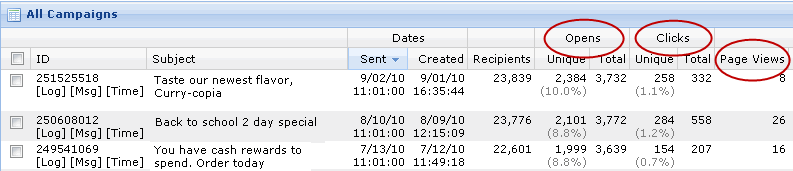
We just launched a new feature that makes it easier to send Follow-Up Emails and create Email Lists from previous campaigns. In the past, to send an Email Campaign to recipients who responded to a previous campaign, users had to visit the EMAIL LISTS section. Here users had to write SQL in the Advanced Query Editor to create a list of recipients who opened, clicked or viewed a certain page from a  past email.  Now users can immediately create an Email List or send an Email Campaign from a report. JangoMail users can filter Opens, Clicks and Page Views reports down to any level to create an Email List or to immediately send an Email Campaign to the recipients in the report.

We have two new options in reporting that will pull the data in a report to:

1. Create an Email List
2. Send an Email Campaign to the email addresses in the report


These icons are available in our Opens, Clicks, and Page Views reports for our email broadcast campaigns.

Create an Email List from a Report
1. Go to Reports.
2. Pull up an Opens, Clicks, or Page Views Report by clicking on any number in those columns.
3. Use the Filter to narrow down your report to the recipients who you would like to add to your Email List. In this example, we are creating an Email List that includes recipients who clicked on a certain link.


4. Click on the Envelope Icon and select Create a List.


5. You might be asked to allow scripted windows. If not, proceed to step 6. Otherwise, click on the message on the top of the screen and chose to allow scripted windows. Then click on the Create a List link again.
6. There will be a short wait while JangoMail creates your Email List. When it is ready, it will appear in the section under the Lists tab.

Send an Email Campaign from a Report
1. Go to Reports.
2. Pull up an Opens, Clicks, or Page Views Report by clicking on any number in those columns.

3. Use the Filter to narrow down your report to include only the recipients who you would like to email. In this example, we will use a list that includes customers who clicked on a certain link.


4. Click on the Envelope icon and click Send Email.


5. In a few moments, JangoMail will upload an Email List from the report and direct you to the Messages Page so that you can begin composing your message.